



Can Tana AI Actually Think
Ahead of You?
After 30 days of daily use, we discovered whether Tana's "Supertags" and AI meeting agent are game-changers — or just another productivity trap.
- What Is Tana AI — And Why the Hype?
- Supertags: The Feature That Changes Everything
- The Meeting Agent That Saves 30 Minutes Per Call
- Pricing: Is It Worth Your Money?
- Pros & Cons
- Real User Pulse: What Reddit Says
- Tana vs Notion vs Roam: The Brutal Comparison
- Who Should Actually Use Tana?
- Expert Editorial Verdict
- Final Score & Verdict
- Frequently Asked Questions
What Is Tana AI — And Why the Hype?
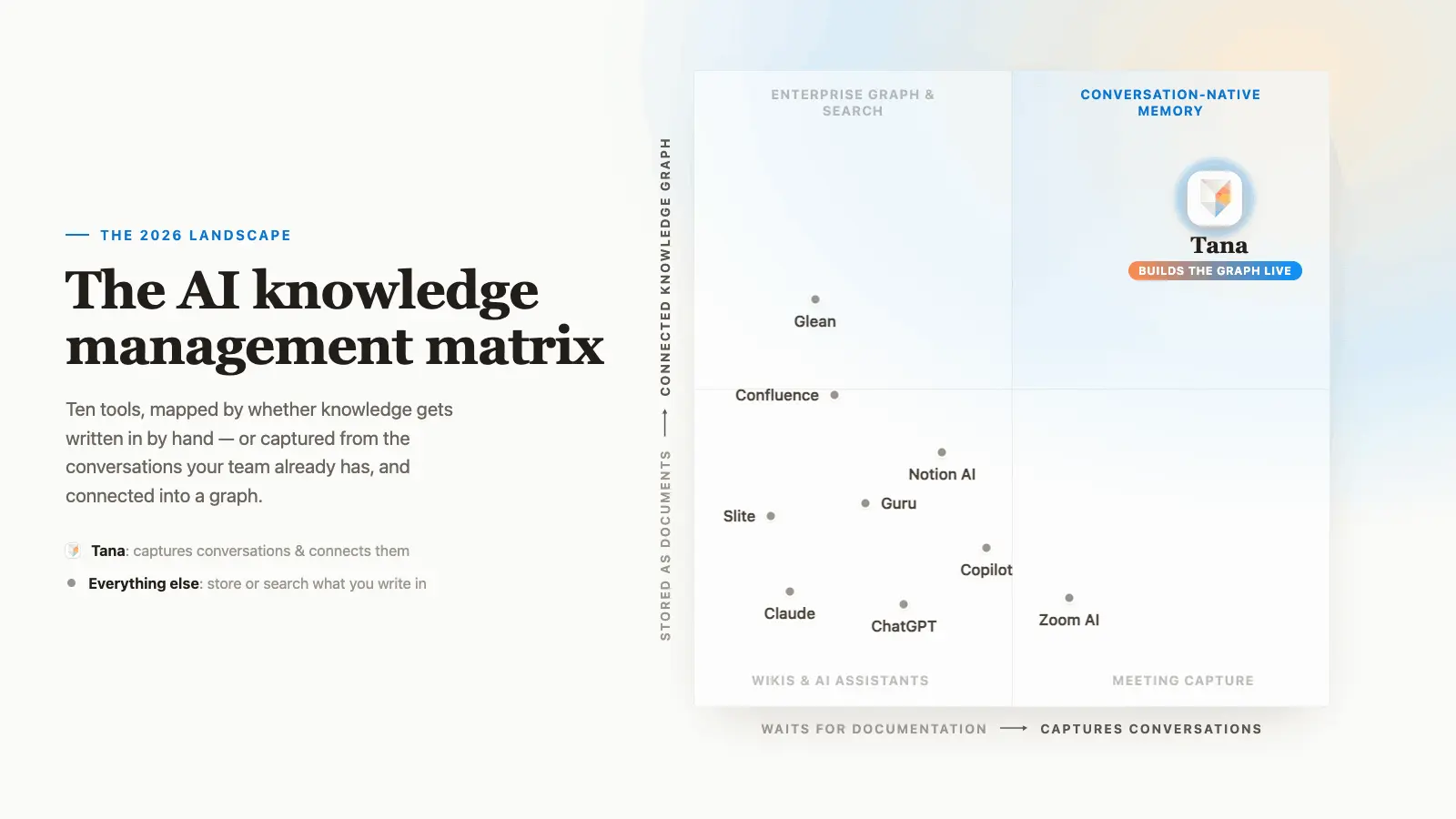
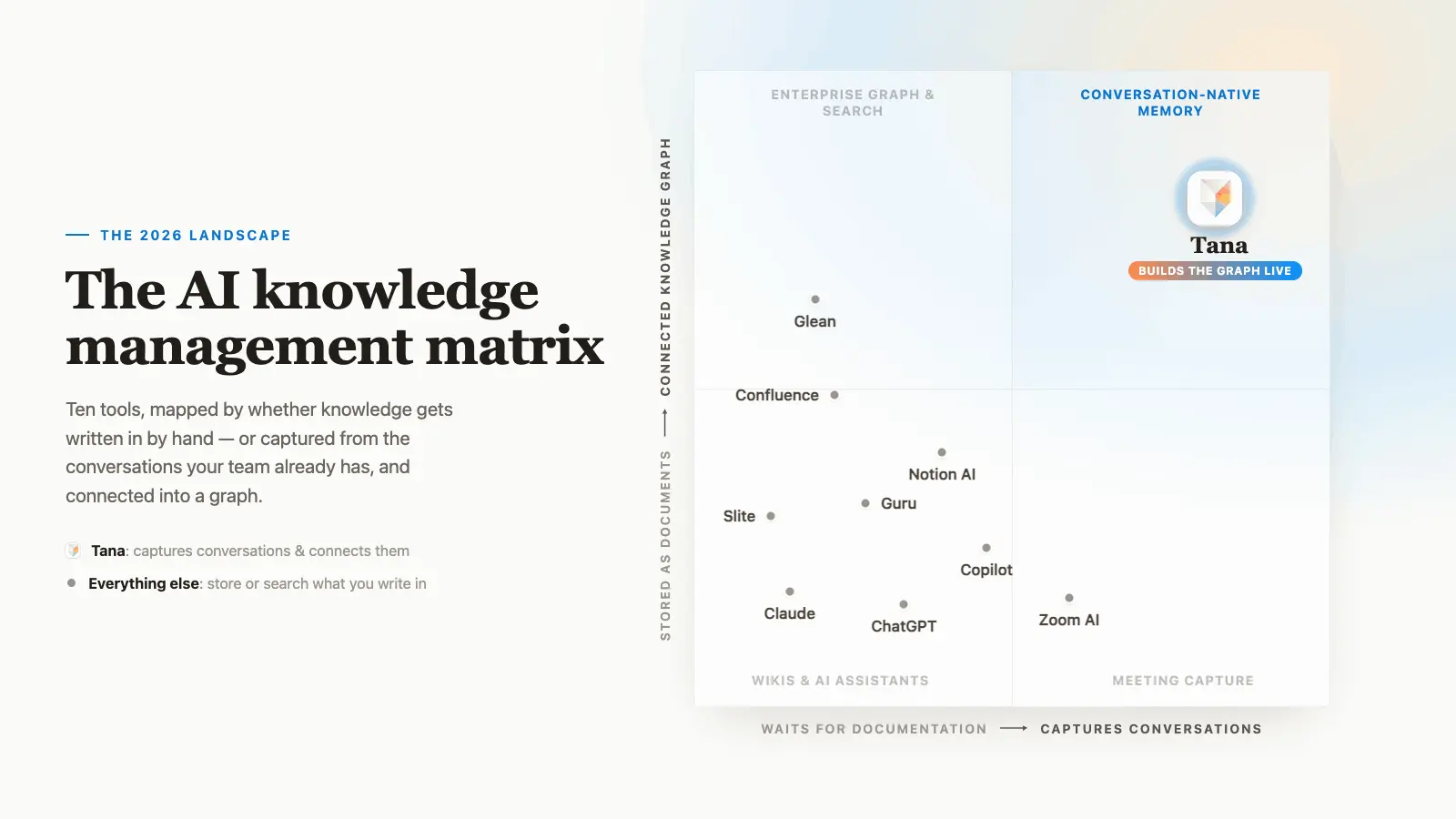
Tana is not just another note-taking app. It's an AI-native workspace that combines outliner-style note-taking with structured data systems — think Roam Research meets Notion, but with AI built into the DNA from day one. Founded in 2021 and backed by $25 million in early 2025, Tana has been quietly building one of the most powerful knowledge management systems available.
Here's the emotional reality: most of us are drowning in notes scattered across half a dozen apps. We capture ideas in Apple Notes, tasks in Todoist, meeting notes in Google Docs, and research in Notion. Tana's pitch is simple but radical: what if one tool could handle all of it — and actually understand the relationships between your ideas?
Supertags: The Feature That Changes Everything
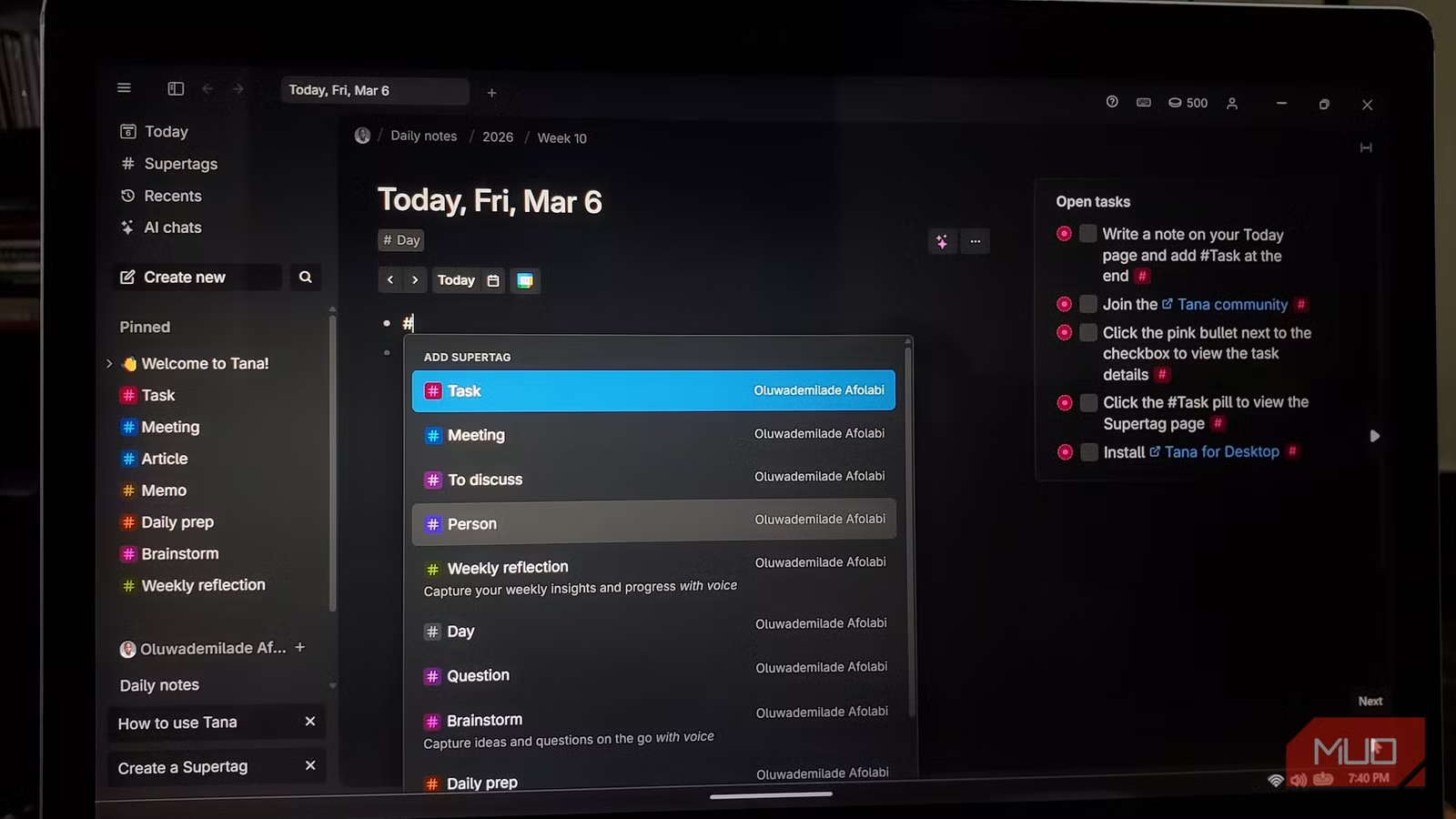
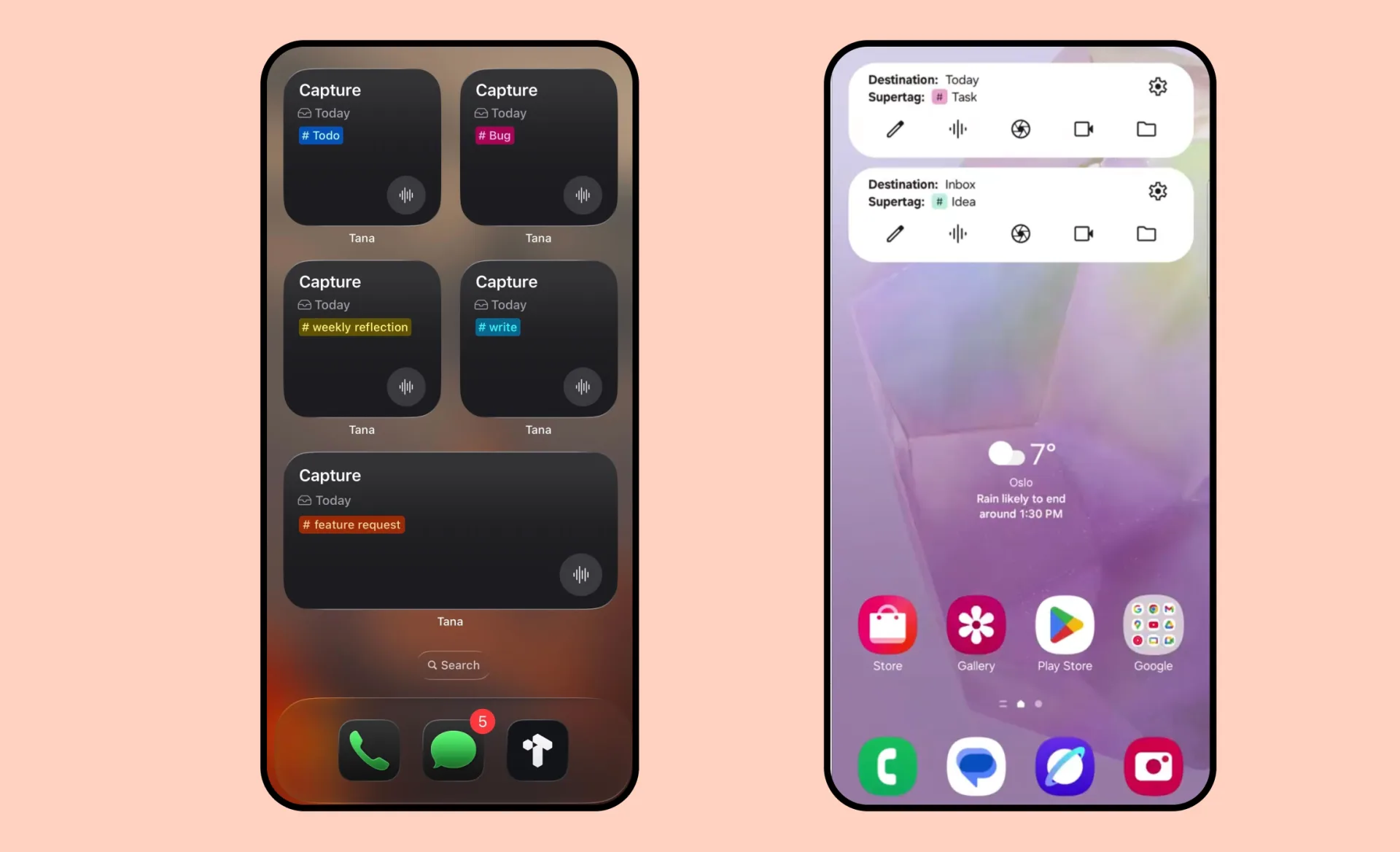
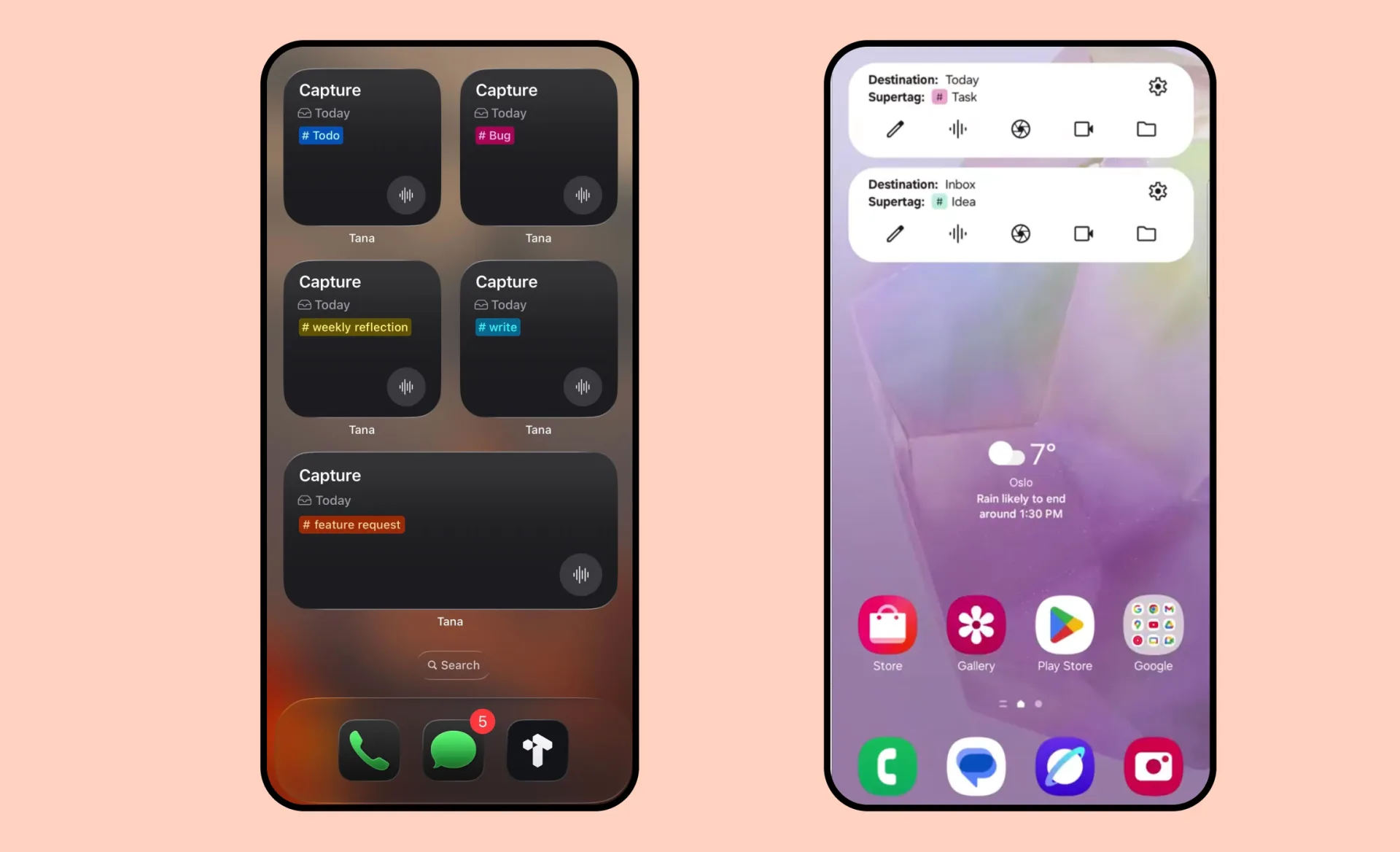
Imagine tagging a note with #book and instantly getting fields for author, rating, status, and genre. That's a Supertag. It's not just a label — it's a typed data structure that transforms any bullet point into a mini-database entry.
I spent my first week frustrated. The learning curve is real — steep enough that XDA Developers noted "other parts feel unfinished." But by day 10, something clicked. My meeting notes started auto-linking to client records. My reading list became a searchable database. My daily journal started surfacing patterns I hadn't noticed.
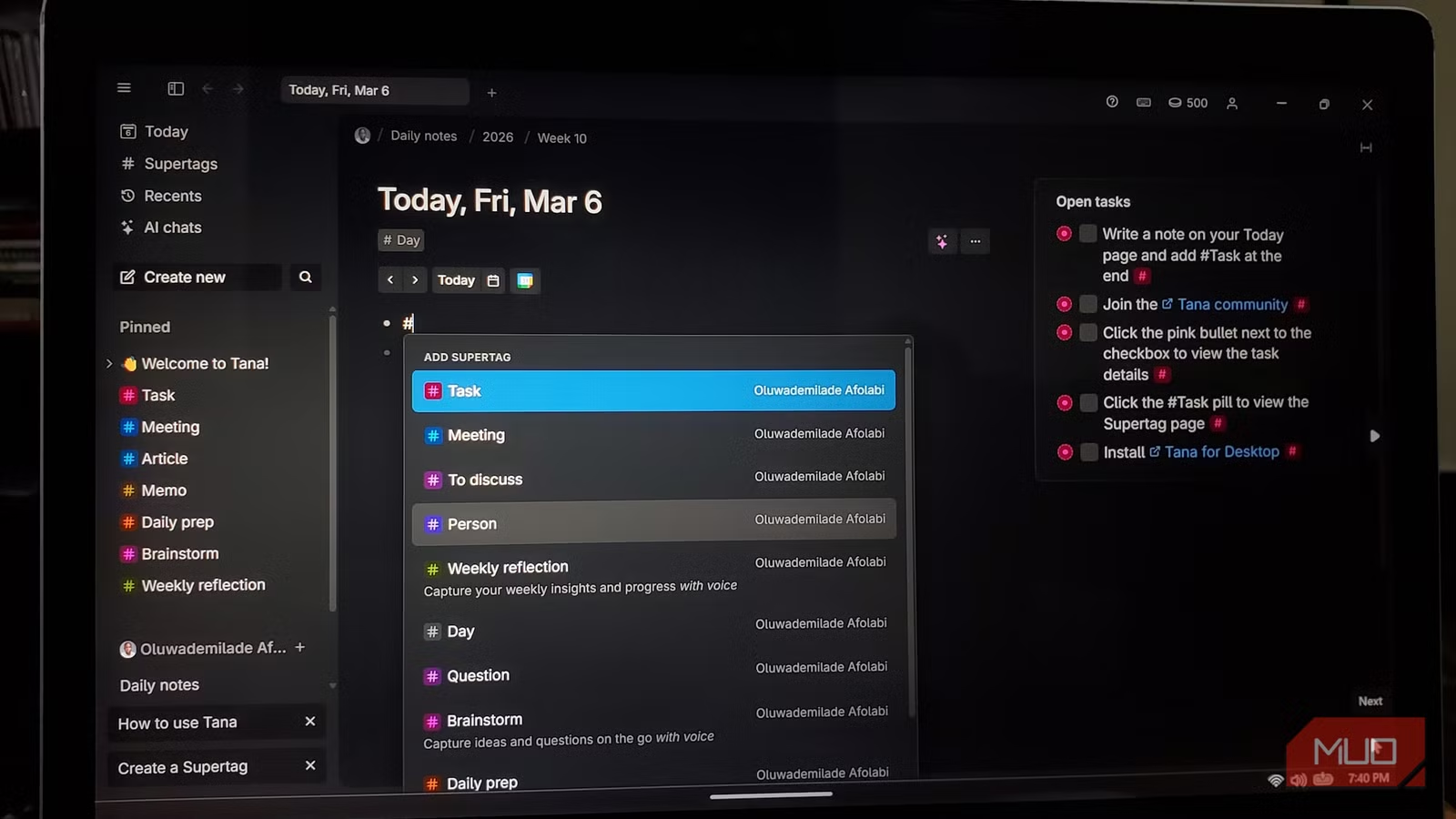
#meeting and Tana automatically extracts attendees, action items, and deadlines — then links them to your existing project notes.
Live Queries: Your Brain, But Faster
Tana's live queries are where the magic happens. Instead of manually updating a project dashboard, you write a query like "show me all incomplete tasks tagged #urgent from meetings this week" — and it updates in real-time. No manual maintenance. No stale data. Just a living, breathing view of your work.
The Meeting Agent That Saves 30 Minutes Per Call
This is Tana's clearest ROI. Connect your Google Calendar, and Tana's AI meeting agent automatically:
- Transcribes your calls in real-time (6 languages supported)
- Summarizes key points and decisions
- Extracts action items with assignees and deadlines
- Links everything back to existing client records and projects
The entire process takes under 7 minutes post-call. If you bill at $75/hour and have just 2 client calls per week, Tana pays for itself in a single meeting.
Pricing: Is It Worth Your Money?
Here's where Tana gets complicated. The free plan exists, but with a critical limitation: only 5 Supertags. Since Supertags are the core feature, you can't actually test the tool properly without paying.
| Plan | Price | What You Get | Best For |
|---|---|---|---|
| Free | $0 | 500 AI credits, 5 Supertags, 2 workspaces, basic editor | Testing the interface only — not real workflows |
| Plus | $10/mo ($8/yr) | 2,000 AI credits, unlimited Supertags, Google Calendar sync, meeting agent, Readwise integration | Solo founders, consultants, knowledge workers |
| Pro | $18/mo ($14/yr) | 5,000 AI credits, advanced AI models, password-protected pages, unlimited file storage | Power users with 10+ meetings/week |
Pros & Cons
✓ What Makes Tana Special
- ✅ Supertags are genuinely innovative — no other tool combines outliner freedom with database structure this elegantly
- ✅ Meeting agent saves 30+ minutes per call with automatic transcription, summaries, and action items
- ✅ Live queries create dynamic dashboards that update automatically — no manual maintenance
- ✅ Voice capture supports 61 languages — record ideas on the go and get structured notes instantly
- ✅ Active development with regular feature releases and a growing community
- ✅ Excellent performance even with large databases — unlike Roam's 10,000-note slowdown
✗ The Hard Truths
- ❌ Steep learning curve — budget 3-5 hours of setup before it "clicks," and don't judge until week two
- ❌ Free plan is essentially a demo — 5 Supertag cap makes real testing impossible without paying
- ❌ Cloud-only with no local storage option — your data lives on Tana's servers
- ❌ Mobile experience is functional but not optimized — web app works, native apps are improving
- ❌ Smaller community than Notion or Obsidian — fewer templates, plugins, and tutorials
- ❌ Export to JSON/Markdown exists but Supertag schemas don't transfer — vendor lock-in is real
💡 Real User Pulse: What Reddit Says
We dug through productivity forums, Reddit threads, and Trustpilot reviews to find what actual users — not marketers — are saying about Tana.
"I switched from Notion to Tana 4 months ago. The first two weeks were painful — I almost gave up. But once Supertags clicked, I realized I'd been organizing information wrong my entire life. My meeting notes now auto-link to projects. My reading list is a living database. It's not for everyone, but for people who live in their notes, it's transformative."
"The meeting agent alone is worth the $10/month. I do 8-10 client calls per week. Tana transcribes, summarizes, and pulls out action items before I even finish my coffee. Compared to Otter.ai + Notion + manual organization, I'm saving 4-5 hours per week minimum. ROI is insane."
"Honestly? Tana is overkill for 90% of people. If you just need a place to jot down grocery lists and occasional meeting notes, Apple Notes or something simpler is fine. Tana shines when your notes are complex, interconnected, and mission-critical. Otherwise it's like using a Formula 1 car to commute."
Tana vs Notion vs Roam: The Brutal Comparison
| Feature | Tana | Notion | Roam Research |
|---|---|---|---|
| Core Model | Outliner + Structured Data (Supertags) | Block-based + Databases | Pure Outliner + Bidirectional Links |
| AI Integration | Native (Meeting Agent, Auto-tagging, Summaries) | Add-on ($10/mo for Notion AI) | Minimal / Third-party only |
| Learning Curve | Steep (3-5 hours setup) | Moderate (gentle start) | Steep (weeks to master) |
| Pricing | Free (limited) / $10-18/mo | Free (generous) / $10/mo | $15/mo (no free plan) |
| Data Ownership | Cloud-only | Cloud-only | Cloud-only |
| Mobile Experience | Web app (improving) | Native iOS + Android | No native app |
| Best For | Solo knowledge workers, consultants, researchers | Teams, project management, general use | Daily journal writers, Zettelkasten purists |
If you're team-oriented, Notion or Fireflies.ai might be better fits. If you want local data ownership, Obsidian is the gold standard. Tana occupies a unique middle ground: more structured than Roam, more AI-native than Notion.
Who Should Actually Use Tana?
✅ Tana Is Perfect For You If:
• You run 5+ client meetings per week and need automatic transcription, summaries, and action item extraction
• You're a knowledge worker who thinks in interconnected ideas — researchers, writers, consultants, developers
• You outgrew simple note apps but find Notion too rigid and Roam too unstructured
• You're willing to invest 3-5 hours upfront to build a system that pays dividends for months
• You bill $75+/hour and can recover the $10/month cost in a single meeting
❌ Skip Tana If:
• You just need a simple to-do list or basic note app — Apple Notes or simpler tools will serve you better
• You're doing fewer than 3-4 client calls per week — the meeting agent is Tana's strongest ROI
• Budget is tight and you're unsure you'll stick with it — the free plan doesn't let you test core features
• You need robust team collaboration with real-time editing — Notion is still the team king
Expert Editorial Verdict
I've been testing productivity tools for six years. Tana is the first app that made me genuinely reconsider my entire note-taking stack. The Supertag system isn't just a feature — it's a fundamentally different way of thinking about information.
Here's what surprised me most: after two weeks of daily use, Tana started surfacing connections I hadn't explicitly made. A client mention in a meeting note auto-linked to a project I hadn't thought about in months. A book quote I captured three weeks ago appeared in a query about a current writing project. This isn't magic — it's structured data done right.
But I'm not blind to the flaws. The 5-Supertag free plan is borderline misleading — you can't evaluate the tool properly without paying. The mobile experience needs work. And if you're not doing regular meetings, the ROI math gets fuzzy fast.
My advice? Start on the monthly Plus plan ($10). Spend one focused weekend learning Supertags. Use it for two weeks before judging. If the meeting agent alone doesn't save you 2+ hours per week, cancel. But I suspect you won't.
Final Score & Verdict
Tana AI is not for everyone — and that's exactly its strength. For solo knowledge workers, consultants, and anyone who lives inside their notes, it's the most innovative productivity tool of 2026. The Supertag system and AI meeting agent deliver genuine, measurable ROI. But the steep learning curve and limited free plan mean it's a commitment, not an impulse download.
If you're ready to invest time upfront and your work involves complex, interconnected information, Tana will transform how you think. If you just need a prettier Google Docs, look elsewhere.
Frequently Asked Questions
It depends on your needs. Tana is better for solo knowledge workers who need structured, interconnected notes with AI assistance. Notion is better for teams and general project management. If you need team collaboration, stick with Notion. If you want a personal second brain with AI superpowers, Tana wins.
Yes, but with a critical limitation: only 5 Supertags. Since Supertags are Tana's core feature, the free plan is essentially a demo. To properly test the tool, you'll need the Plus plan at $10/month.
Connect your Google Calendar, and Tana automatically joins your meetings (with permission). It transcribes in real-time, summarizes key points, extracts action items, and links everything to your existing notes and projects. The entire process completes within 7 minutes of the call ending.
Tana is cloud-only, meaning your data lives on their servers. They offer encryption in transit and at rest, but if data sovereignty is critical, consider local-first alternatives like Obsidian. Export to JSON and Markdown is available, though Supertag structures don't transfer cleanly.
Budget 3-5 hours of focused setup time, and don't judge the tool until you've used it for two weeks. The Supertag concept takes time to internalize, but once it clicks, most users report a "lightbulb moment" around day 10-14.
Tana supports Markdown and JSON import, but the migration is manual and tedious. Supertag schemas, live queries, and bidirectional links don't transfer automatically. If you have thousands of existing notes, expect to spend significant time rebuilding your system — or start fresh.
🔑 Related Keywords
Exit Hook: So here's the real question — are your current notes actually helping you think better, or just storing information you'll never find again? If it's the latter, maybe it's time to let an AI do the heavy lifting. What's the most frustrating thing about your current note-taking setup? Drop a comment below.

Comments
Post a Comment