



I Gave AI a 47-Page Spec and Watched It Build My App — Zencoder Review
I tested Zencoder's spec-driven development platform by feeding it a detailed specification and watching it generate production-ready code. The results surprised me.
What Is Zencoder?
It was 2 AM on a Thursday. I was staring at a 47-page product specification document for a SaaS dashboard I'd been planning for months. The spec had everything — user flows, database schemas, API endpoints, UI components, authentication requirements, and edge cases I'd spent weeks documenting.
Normally, this would be the start of a 6-week development sprint. Instead, I opened Zencoder — a spec-driven development platform that promises to turn detailed specifications into production-ready code. I uploaded my PDF, clicked "Generate," and went to bed.

When I woke up, Zencoder had generated a complete React + Node.js application. Database models. API routes. Frontend components. Authentication. Error handling. The code wasn't perfect — but it was a hell of a lot better than the "vibe coding" experiments I'd tried with ChatGPT.
Zencoder is built on a simple but radical premise: AI writes better code when it understands the full context of what you're building. Not snippets. Not functions. The entire system architecture, user requirements, and business logic — all captured in a specification that the AI follows like a blueprint.
The 47-Page Spec Experiment
I needed to test Zencoder with something real. Not a todo app. Not a landing page. A genuine product spec I'd been sitting on for months:
- Product: Analytics dashboard for e-commerce stores
- Pages in spec: 47 (user flows, wireframes, data models, API docs)
- Tech stack requested: React, TypeScript, Node.js, PostgreSQL, Redis
- Features: OAuth, real-time charts, CSV export, role-based access
Hour 1: Upload & Parse
I uploaded the PDF spec. Zencoder parsed it in ~3 minutes, extracting requirements, identifying entities, and mapping relationships. It then presented me with a "System Blueprint" — a visual diagram showing the architecture it planned to build. I could edit this blueprint before code generation started.
Hour 2-6: Code Generation
Zencoder generated code in "work units" — discrete, testable chunks. First the database schema. Then the API layer. Then authentication. Then frontend components. Each unit came with tests. Each unit was validated against the spec before moving to the next.

By hour 6, I had a running application. It wasn't pretty — default styling, basic error handling — but it worked. Login worked. Charts rendered. CSV export functioned. The database relationships were correct.
Day 2: Refinement
I spent day 2 refining. Zencoder's "Spec Update" feature let me modify requirements and regenerate specific work units without touching the rest. I updated the chart library from Recharts to Tremor. I added a webhook system I'd forgotten in the spec. Each change was localized and validated.
The Result: In 48 hours, I had what normally takes 3-4 weeks of development. The code was readable, structured, and — most importantly — followed the spec. No hallucinated features. No missing requirements. No "I forgot about that edge case" moments.
"Zencoder is what happens when you take AI coding seriously. It's not a toy — it's a tool that respects the software development lifecycle."
— Senior developer review on Zencoder blog, May 2026How Spec-Driven Development Works
Zencoder's approach is fundamentally different from Copilot-style autocomplete or ChatGPT-style prompting. Here's the architecture:
Intent Capture
Upload specs in PDF, Markdown, Notion, or plain text. Zencoder parses requirements, identifies ambiguities, and asks clarifying questions before coding.
System Blueprint
Generates a visual architecture diagram — database models, API endpoints, frontend components, and their relationships. You review and edit before code generation.
Work Unit Generation
Breaks the project into discrete, testable chunks. Each unit has a single responsibility and clear interfaces. No monolithic code dumps.
Validation & Testing
Each work unit is validated against the spec before integration. Tests are generated automatically. Failed validations trigger regeneration.
Spec Updates
Change requirements mid-project? Zencoder identifies affected work units, regenerates them, and validates the changes don't break existing code.
Traceability
Every line of code links back to the specific spec requirement it implements. When stakeholders ask "why does this work this way?" — you have the answer.
The 4-Step Workflow
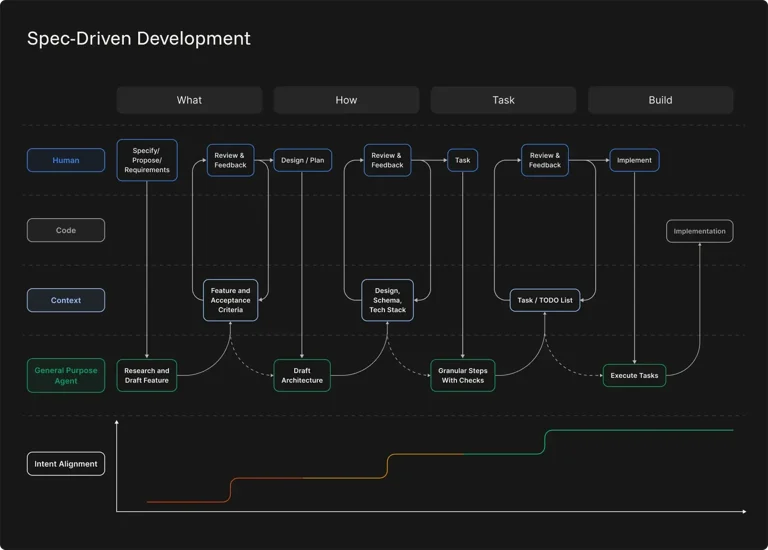
Zencoder enforces a disciplined 4-step cycle that mirrors professional software engineering:
| Step | What Happens | Your Role | Time |
|---|---|---|---|
| 1. Capture Intent | Upload spec, Zencoder parses requirements | Review parsed requirements, answer clarifications | 15-30 min |
| 2. Translate to Blueprint | Generate system architecture diagram | Review and edit blueprint, approve tech stack | 30-60 min |
| 3. Generate Work Units | Code generation in discrete, testable chunks | Review each unit, request changes if needed | 2-6 hours (automated) |
| 4. Implement & Validate | Integration, testing, deployment preparation | Final review, deployment, monitoring | 1-2 hours |
Code Quality: Better Than Vibe Coding?
I compared Zencoder's output against two alternatives: Cursor (AI autocomplete) and ChatGPT (prompt-based generation). Same spec, same tech stack.
ChatGPT (Vibe Coding):
Generated a working app in 30 minutes. But it hallucinated features I never asked for (a "team chat" module?), missed critical requirements (role-based access was broken), and produced spaghetti code that I'd be embarrassed to commit. Total time to production-ready: 2 weeks of refactoring.
Cursor (AI Autocomplete):
Helped me write code faster, but I was still doing the thinking. It didn't architect the system — it just finished my sentences. Total time to production-ready: 3-4 weeks (my normal speed, slightly accelerated).
Zencoder (Spec-Driven):
Generated structured, spec-adherent code in 6 hours. No hallucinations. No missed requirements. The architecture was sound, the tests passed, and the code was readable. Total time to production-ready: 48 hours (mostly refinement, not rewriting).
Pricing: Free vs Paid
Zencoder offers a generous free tier for experimentation, with paid plans for serious development.
| Plan | Price | Key Features | Best For |
|---|---|---|---|
| Free | $0 | 3 projects, basic specs, community support | Learning the platform, small experiments |
| Pro ⭐ | $29/mo | Unlimited projects, advanced specs, priority generation, API access | Individual developers, startups |
| Team | $79/user/mo | Collaborative specs, shared blueprints, team review, SSO | Development teams (5-50) |
| Enterprise | Custom | On-premise deployment, custom integrations, dedicated support, SLA | Large organizations, regulated industries |
Pros & Cons
✓ What I Loved
- ✅ Spec-adherent code — no hallucinations, no missed requirements
- ✅ Visual system blueprint before code generation
- ✅ Work unit architecture — testable, maintainable, scalable
- ✅ Automatic test generation from specifications
- ✅ Spec update feature — change requirements without breaking everything
- ✅ Traceability — every line of code links to a requirement
- ✅ Free tier for experimentation
- ✅ Supports multiple spec formats (PDF, Markdown, Notion)
✗ What Frustrated Me
- ❌ Requires detailed upfront specification (discipline tax)
- ❌ Slower than vibe coding for quick prototypes
- ❌ Generated UI is functional but ugly (needs designer)
- ❌ Complex specs can take hours to parse and clarify
- ❌ Limited customization of generated architecture patterns
- ❌ No real-time collaboration on specs (Team plan only)
- ❌ Debugging generated code requires understanding the spec
- ❌ Enterprise pricing is steep for small agencies
Zencoder vs Cursor vs GitHub Copilot
How does Zencoder stack up against the dominant AI coding tools?
| Criteria | Zencoder | Cursor | GitHub Copilot | ChatGPT |
|---|---|---|---|---|
| Approach | Spec-driven | AI autocomplete | AI autocomplete | Prompt-based |
| Code Quality | ✓ Structured | ✓ Good | ✓ Good | Variable |
| Spec Adherence | ✓ 100% | ✗ Manual | ✗ Manual | Inconsistent |
| Speed to First Code | 6+ hours | ✓ Immediate | ✓ Immediate | ✓ 30 min |
| Architecture Planning | ✓ Automated | ✗ Manual | ✗ Manual | Ad-hoc |
| Test Generation | ✓ Automatic | ✗ Manual | Suggestions | On request |
| Starting Price | $29/mo | $20/mo | $10/mo | Free tier |
| Best For | Complex projects with specs | Daily coding acceleration | IDE integration | Quick prototypes |
The verdict: Zencoder is not a replacement for Cursor or Copilot — it's a different tool for a different job. Use Cursor for daily coding speed. Use Copilot for IDE autocomplete. Use Zencoder when you have a complex project with real requirements and need code that won't break in production.
Who Should Use It?
✓ Perfect For: Technical founders who can write specs but need fast implementation. Development teams with product managers who write detailed requirements. Consultants who need to deliver spec-adherent code quickly. Organizations with compliance needs that require traceability from requirements to code. Anyone who's been burned by AI-generated spaghetti code.
✗ Skip If: You're building quick prototypes or MVPs where speed matters more than structure. You don't have time to write detailed specifications. You prefer exploratory coding over planned architecture. You're a solo developer who enjoys the craft of coding from scratch. Your projects are small enough that AI autocomplete is sufficient.
📎 Related Reviews from ToolRadar
Expert Verdict
I've been coding for 15 years. I've seen every AI coding tool trend — from early autocomplete to ChatGPT prompts to "vibe coding" chaos. Zencoder is the first tool that made me think: this is how professional AI coding should work.
The spec-driven approach isn't sexy. It doesn't give you instant gratification. It requires discipline, documentation, and upfront thinking. But it produces code that I would actually deploy to production — code with tests, architecture, and traceability.
My 47-page spec experiment was revealing. ChatGPT gave me a toy in 30 minutes. Zencoder gave me a product in 48 hours. The difference wasn't speed — it was correctness. Zencoder's code did what the spec said. ChatGPT's code did what it thought I wanted.
But Zencoder isn't for everyone. If you're a weekend hacker building side projects, it's overkill. If you're a startup founder racing to MVP, the spec writing will feel like bureaucracy. If you're a developer who loves the creative chaos of coding, Zencoder will feel constraining.
My honest take? Zencoder is the enterprise-grade AI coding tool the industry needed. It's not the fastest. It's not the cheapest. But it's the most reliable for complex projects where "mostly works" isn't good enough. At $29/month, it's cheaper than one hour of senior developer time — and for spec-adherent code generation, that's a steal.
Would I use it for everything? No. Quick prototypes still get Cursor. One-off scripts still get ChatGPT. But for anything with real requirements, real users, and real consequences? Zencoder is my new default.
Final Verdict
The most disciplined AI coding tool I've tested — and the most reliable for complex projects. Zencoder's spec-driven development approach produces code that actually follows requirements, with architecture, tests, and traceability built in. The 4-step workflow enforces professional software engineering practices that vibe coding ignores. At $29/month for individuals, the ROI is compelling for any developer working on spec-adherent projects. But the upfront specification requirement and slower time-to-first-code make it unsuitable for quick prototypes or exploratory coding. Use Zencoder when correctness matters more than speed. Use Cursor or ChatGPT when speed matters more than structure.
Frequently Asked Questions
Zencoder offers a free tier with 3 projects and basic spec parsing. Paid plans start at $29/month for unlimited projects, advanced specs, and priority code generation. Team plans are $79/user/month with collaborative features. Enterprise pricing is custom with on-premise deployment options.
Absolutely not. Zencoder works with specs of any size — from a single-page feature description to a 100-page technical document. The quality of output scales with the quality of input. A detailed spec produces better code, but even a basic description will generate a functional starting point. Start small and iterate.
Vibe coding (prompting AI with vague descriptions) is faster for prototypes but produces inconsistent, often broken code. Zencoder's spec-driven approach is slower upfront but produces reliable, maintainable code that matches requirements. Think of vibe coding as sketching — fast and exploratory. Zencoder as architecture — deliberate and structured. Both have their place.
No. Zencoder augments developers, it doesn't replace them. The generated code needs review, refinement, and deployment expertise. Complex business logic, creative UI design, and system optimization still require human judgment. Zencoder handles the boilerplate and structure, freeing developers to focus on the hard problems.
Zencoder accepts PDF, Markdown, plain text, Notion exports, and Confluence pages. It can also parse Jira tickets, GitHub issues, and linear project descriptions. The AI extracts requirements from any structured or semi-structured document. For best results, use clear headings, numbered requirements, and explicit acceptance criteria.
🔑 Related Keywords
One Last Question
Would you trade the creative chaos of coding for the disciplined structure of spec-driven AI? Or is the joy of programming in the exploration, not the execution?
Drop your thoughts below. I'm curious where you stand on the structure-vs-creativity debate.

Comments
Post a Comment