


Is SolidWorks 2026 AI the End of Manual CAD Design?
10 new AI tools are coming to SolidWorks 2026 — Assembly Structure Designer, Design Inspection, Project Planner, and more. Most are in beta now. Here's what actually works, what doesn't, and what it means for your workflow.
Picture this: It's 2 AM. You've been wrestling with a 500-part assembly for six hours. The feature tree is a red mess of errors. Your drawing is due tomorrow. And you're manually clicking through every mate reference, every material assignment, every dimension — one. by. one.
Now imagine asking your CAD software: "Fix the assembly errors and tell me what's wrong." And it actually does. Not a dream. That's SolidWorks 2026.
Dassault Systèmes just dropped the biggest AI update in SolidWorks history. Ten new tools. Three virtual companions. And a promise that by July 2026, your CAD workflow will look nothing like it does today. But here's the thing — most of these tools are in beta right now. Some work brilliantly. Others? Still feel like a tech demo.
What Changed in SolidWorks 2026?
SolidWorks has always been the industry standard for 3D CAD. But for years, "AI" in SolidWorks meant SketchXpert and SmartMates — helpful, sure, but hardly revolutionary. SolidWorks 2025 started the shift with AURA, the first virtual companion. 2026 goes all-in.
The new release introduces three AI companions — LEO (design execution), AURA (knowledge and insight), and MARIE (materials science, coming soon) — plus ten embedded AI tools that handle everything from assembly structure generation to drawing creation, error diagnosis, and project management. The goal? Eliminate the repetitive, soul-crushing tasks that eat 60% of an engineer's day.
But there's a catch. Most of these tools require the 3DEXPERIENCE cloud platform. If you're on a traditional desktop license, you're locked out. And even on 3DEXPERIENCE, many features are still in beta with limited documentation and occasional instability.
The 10 New AI Tools Explained
Here's the full lineup, ranked by how ready they actually are for production use:
1. Assembly Structure Designer Beta — Available Now
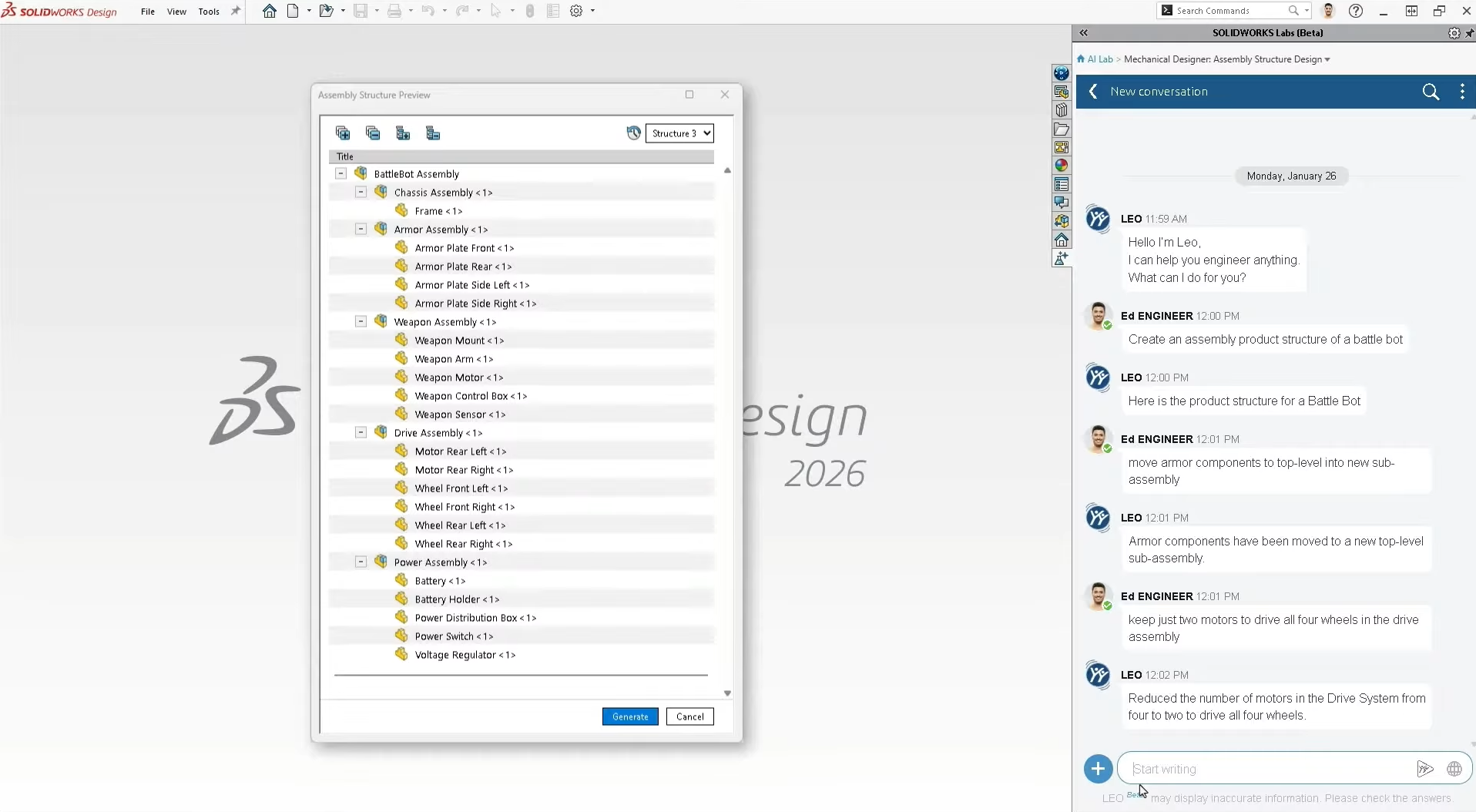
Ask LEO to build your assembly framework from scratch. Type "create a battle bot assembly structure" and it generates chassis, armor, weapon, and drive sub-assemblies with empty part files ready for design. It's a structural outline, not geometry — but it saves hours of manual folder creation.
2. What's Wrong (AI Error Diagnosis) Beta — Available Now
The bane of every SolidWorks user: the red error tree. This AI analyzes cascading failures and points you to the root cause instead of making you hunt through 47 failed features. It recommends fixes but doesn't auto-resolve them yet — that's coming in a future update.
3. Drawing Creation Beta — Available Now
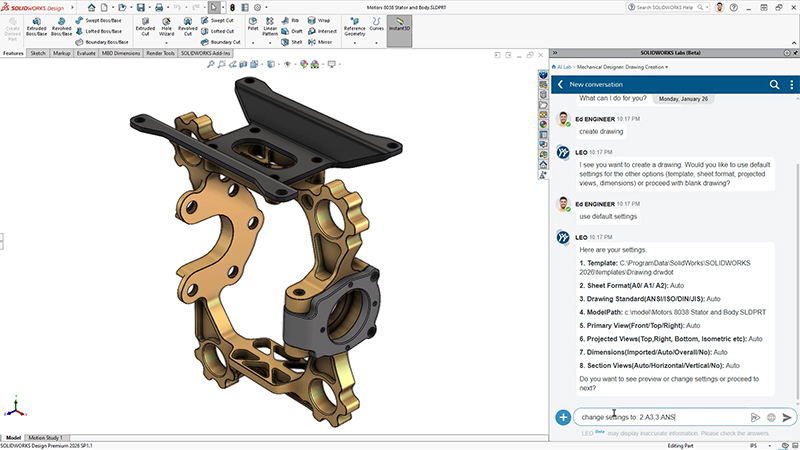
Auto-generate drawings with natural language prompts. Tell LEO your sheet size, drawing standard, and template preferences. It creates views, section cuts, and hole callouts. The output is a starting point — you'll still need to review and refine, but the setup time drops from 30 minutes to 3.
4. Design Inspection Beta — April 2026
Ask your model questions in plain English. "What's the total mass?" "How many vibration damping mounts do I have?" "What material is assigned to the chassis?" The AI reads your assembly metadata and answers instantly — no more digging through property managers.
5. Material Manager Beta — April 2026
Chat-based material assignment and bulk updates. Ask LEO to replace all steel alloy mounts with natural rubber across the entire assembly. What used to take 20 minutes of manual part-by-part editing now happens in a single prompt.
6. Project Planner (AURA Integration) Beta — April 2026
For teams using ENOVIA Project Planner, AURA becomes your project manager inside SolidWorks. Ask "What's blocking the release?" and get instant status summaries without opening dashboards or spreadsheets. It creates tasks, assigns dependencies, and tracks deliverables.
7. Assembly Performance Doctor Beta — April 2026
Large assemblies slowing down? The AI evaluates your model and recommends optimizations — suppress excessive mates, simplify fasteners, reduce detail levels. It diagnoses but doesn't auto-fix yet. Think of it as a performance consultant, not a mechanic.
8. PLM Model Insights Beta — April 2026
Conversational access to PLM metadata without opening files. "Who changed the chassis last?" "What's the revision history?" "Where is this part used?" The AI stitches together revision history, lifecycle state, BOMs, and ownership data in seconds.
9. Design Change Impact Beta — April 2026
Before you modify a critical dimension, ask the AI what breaks. It analyzes downstream dependencies — affected parts, mates, assemblies, and even team members who need notification. Risk assessment before you commit the change.
10. Feature Generator (BREP to Parametric) Beta — Coming Soon
The holy grail for imported geometry. Convert STEP and IGES files into fully editable, feature-based SolidWorks models using AI. No more rebuilding from scratch. This was demoed at 3DExperience World but hasn't shipped yet — expect it later in 2026.
Meet the AI Companions: LEO, AURA & MARIE
SolidWorks 2026 introduces three virtual companions, each with a distinct role:
LEO — The Design Executor
Builds assemblies, creates drawings, fixes errors, assigns materials. The hands-on companion for day-to-day design tasks. Built on generative AI models.
AURA — The Knowledge Keeper
Answers "how do I..." questions using SolidWorks documentation. Manages projects, tracks PLM metadata, and provides insights. Built on Mistral AI.
MARIE — The Materials Scientist
Coming soon. Will provide scientific rationale for material choices, suggest alternatives based on performance requirements, and integrate with Granta Selector.
Here's where it gets complicated. AURA, as it exists today, is primarily a documentation chatbot. It answers questions about SolidWorks operations, searches community forums, and retrieves help content. The headline features — generative assembly creation, AI drawing generation, BREP conversion — were demoed at 3DExperience World 2025 but have not shipped as of mid-2026.
What Works Now vs. What's Still Promised
| Feature | What's Promised | What Actually Ships | Status |
|---|---|---|---|
| Assembly Generation | Text-to-assembly with full geometry | Structure outline only (empty files) | Partial |
| Drawing Creation | Fully auto-generated production drawings | Starting point requiring review | Usable |
| Error Diagnosis | Auto-fix cascading errors | Root cause identification + recommendations | Usable |
| BREP Conversion | STEP/IGES to feature-based CAD | Not yet available | Coming |
| Project Management | Full ENOVIA integration with AI task creation | Status queries and basic task management | Usable |
💡 Real User Pulse: What Engineers Actually Say
The engineering community is cautiously optimistic — with a healthy dose of skepticism. Here's what actual users and industry analysts are reporting:
Pros & Cons
✓ What SolidWorks 2026 AI Gets Right
- ✅ Assembly Structure Designer eliminates hours of manual folder and file creation.
- ✅ What's Wrong AI diagnosis actually finds root causes in complex error trees.
- ✅ Drawing Creation reduces setup time from 30+ minutes to under 3 minutes.
- ✅ Material Manager enables bulk updates via chat — no more part-by-part clicking.
- ✅ Design Inspection answers metadata questions instantly without opening property managers.
- ✅ Project Planner integration means no more switching between CAD and project management tools.
✗ Where It Still Falls Short
- ❌ Most AI tools require 3DEXPERIENCE cloud — desktop users are locked out entirely.
- ❌ Generative features (full assembly creation, BREP conversion) are still not shipping.
- ❌ Beta features have limited documentation and occasional instability.
- ❌ AI recommendations require manual execution — no auto-fix yet for most tools.
- ❌ Cloud dependency raises ITAR/compliance concerns for defense contractors.
- ❌ The gap between demo hype and shipped reality is significant and growing.
Who Should Use It?
Best Fit: Teams already on 3DEXPERIENCE cloud with complex assemblies (100+ parts), frequent drawing generation needs, and ENOVIA project management workflows. Design teams struggling with repetitive material assignments and error diagnosis will see immediate ROI.
Hold Off If: You're on desktop-only licenses, work in ITAR-regulated environments, or need fully automated generative design (not just assistance). Also reconsider if your assemblies are simple — the AI overhead may not justify the learning curve.
Alternative Path: Desktop users should explore local AI features like Fastener Recognition, Command Predictor, and Picture to Sketch. They're limited but available now without cloud migration.
Expert Editorial Opinion
I've been using SolidWorks since 2008. I've watched every "revolutionary" feature come and go. 2026 is different — but not for the reasons Dassault markets.
The real value isn't in the headline-grabbing generative AI demos. It's in the quiet, practical tools: Assembly Structure Designer, What's Wrong diagnosis, and Drawing Creation. These are the features that save 20 minutes, 50 times a week. That's where the ROI lives.
But I'm frustrated by the platform lock-in. Forcing cloud migration to access AI companions is a business decision, not a technical one. Desktop users — the majority of the 8-million-user base — are being treated as second-class citizens. And the gap between what was demoed and what ships is becoming a credibility problem.
My recommendation? If you're on 3DEXPERIENCE, activate the beta features immediately. The Drawing Creation and What's Wrong tools alone justify the update. If you're on desktop, wait for the 2026 SP2 release and evaluate whether cloud migration makes sense for your compliance and budget constraints.
Final Verdict
SolidWorks 2026 AI is the most significant update in a decade — but it's a tale of two realities. The practical tools (Drawing Creation, What's Wrong, Assembly Structure) are genuinely useful and ready for production. The generative promises (full AI assembly creation, BREP conversion) remain just that — promises.
If you're already on 3DEXPERIENCE, this is a no-brainer upgrade. If you're on desktop, the math is harder. The local AI features are nice-to-haves, not must-haves. And the cloud migration cost may not pencil out for smaller teams.
The bottom line: SolidWorks 2026 AI won't replace manual CAD design yet. But it will make the manual parts significantly less painful — and that's worth something.
🔑 Related Keywords
Related Reads: Curious how other CAD tools are integrating AI? Check out our deep dives on AI coding tools, v0.dev vs Bolt.new, and open-source AI alternatives.
So here's my question for you: Would you migrate your entire team to the cloud just to access AI features — or are you waiting for Dassault to bring these tools to desktop? Drop your take in the comments. 👇

Comments
Post a Comment