


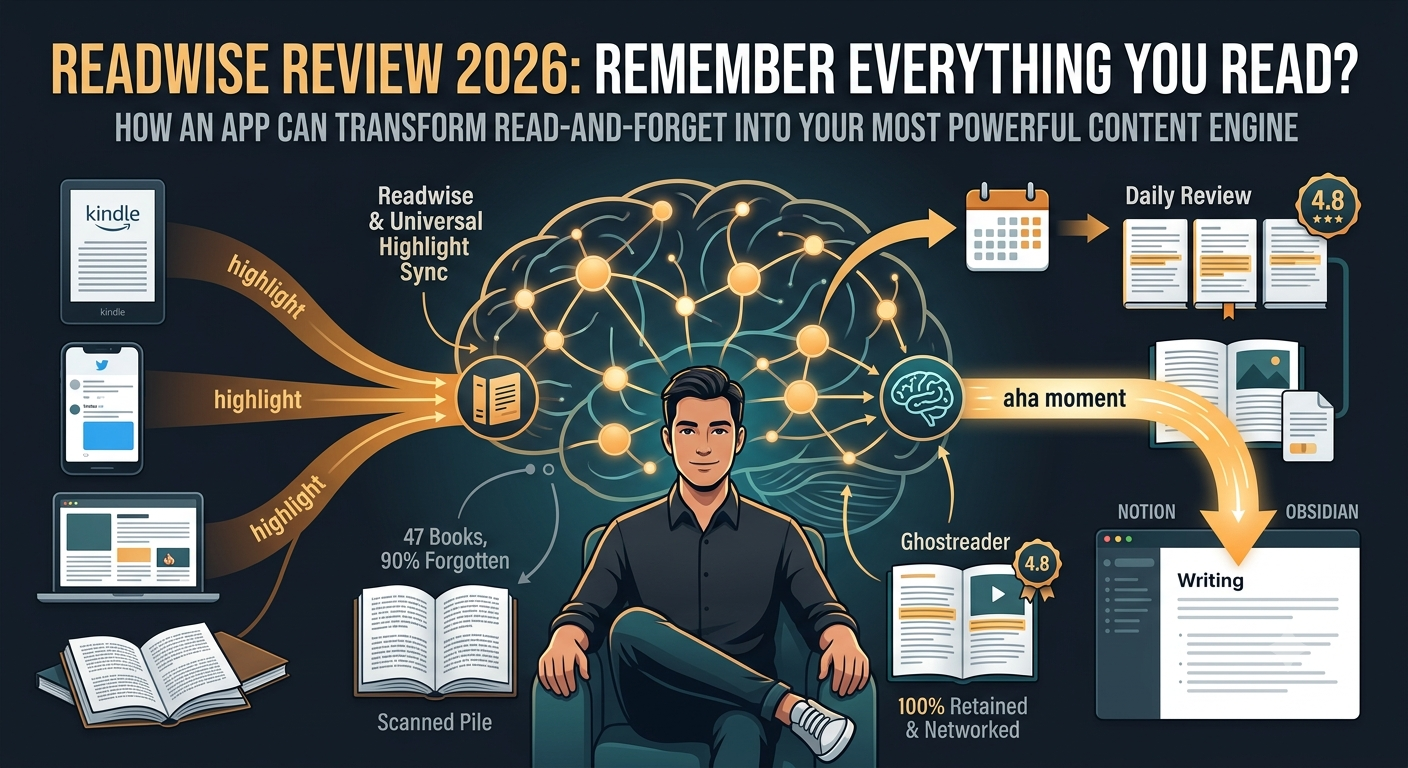
Readwise Review 2026: Can This App Really Make You Remember Everything You Read?
I read 47 books last year and forgot 90% of them. Then I tried Readwise for 30 days. Here's what happened to my brain — and my content output.
- The Brutal Truth: You Forget 90% of What You Read
- What Is Readwise? (The 30-Second Version)
- Core Features That Actually Matter
- How It Works (Step-by-Step)
- Pricing: Is $8/Month Worth It?
- Pros & Cons
- Readwise vs Matter vs Pocket
- Real User Sentiment: The Content Creator's Nightmare
- Who Should Use It?
- Expert Opinion: I Tested It for 30 Days
- Final Verdict
- FAQ
The Brutal Truth: You Forget 90% of What You Read
Let me ask you something. You finished a great book last month. Can you name 3 key insights from it right now? Without checking your notes?
Most people can't. And it's not your fault.
Our brains are designed to forget. It's called the "forgetting curve" — discovered by Hermann Ebbinghaus in 1885. Within 24 hours of reading something, you lose 50-80% of it. Within a week, it's basically gone. You spent 8 hours reading a book, and a month later you remember the cover color.
As a content creator, this was killing me. I'd read 47 books in 2025, highlight hundreds of passages, and when it came time to write — nothing. Blank. I'd spend more time searching for that "perfect quote" than actually writing. Researchers face the same problem: you read 50 papers for a literature review, and by the time you write, you've lost the thread.
That's when I found Readwise.
What Is Readwise? (The 30-Second Version)
Readwise is a knowledge management platform that does two things exceptionally well: it collects all your highlights from every source (Kindle, articles, PDFs, podcasts, Twitter threads, YouTube videos) into one place, and then it resurfaces them to you at scientifically optimal intervals using spaced repetition.
Think of it as a "second brain" for everything you've ever read. Except this brain doesn't forget.
Founded in 2017 by Daniel Doyon, Readwise has evolved from a simple highlight aggregator into a full reading ecosystem. The core product is Readwise (the highlight manager), but the star of the show is Readwise Reader — a read-it-later app built specifically for people who actually want to learn from what they save, not just hoard links.
Core Features That Actually Matter
Universal Highlight Sync
Pulls highlights from Kindle, Kobo, Apple Books, Instapaper, Pocket, Medium, Twitter, PDFs, EPUBs, and even physical books via OCR. One library to rule them all.
Daily Review (Spaced Repetition)
Resurfaces 5-15 highlights daily via email or app. Uses spaced repetition science to show you the right highlight at the right time for maximum retention.
AI-Powered Features (Ghostreader)
GPT-powered summarization, Q&A generation, "find similar highlights," and chat with your entire reading database. Ask "what did I read about habits?" and get an instant synthesis.
Export to Note Apps
Auto-syncs to Notion, Obsidian, Evernote, Roam Research, Heptabase, and Craft. Your highlights flow directly into your writing workspace — no copy-pasting.
And here's what separates Readwise from every other "save for later" app: it's not about collecting. It's about connecting. The AI doesn't just store your highlights — it finds patterns across books you read years apart. It surfaces a quote from a philosophy book next to a stat from a business book and shows you the connection you never saw.
How It Works (Step-by-Step)
Step 1: Connect your reading sources. Kindle, Instapaper, Pocket, Twitter, RSS feeds — Readwise pulls everything automatically. For physical books, use the mobile OCR camera.
Step 2: Read and highlight as normal. Readwise Reader replaces your read-it-later app with a distraction-free, keyboard-shortcut-powered reading environment. Highlight with a keystroke. Add notes instantly.
Step 3: Tag and organize. Add tags like "content-ideas," "research," or "life-changing." Add your own notes to any highlight. The AI can even auto-suggest tags based on content.
Step 4: Let the Daily Review do its magic. Every morning, 5-15 highlights arrive in your inbox or app. Review them in 5 minutes. Rate them. The AI learns what matters to you and adjusts frequency.
Step 5: Export to your note app. Notion, Obsidian, Roam — your highlights sync automatically with full metadata (book title, author, page number, your notes, tags).
Step 6: Use AI to synthesize. Ask Ghostreader to summarize a book from your highlights. Find similar concepts across your library. Generate writing prompts from your own reading.
That's it. Six steps from "I read and forget" to "I have a searchable, AI-enhanced database of everything I've ever learned."
Pricing: Is $8/Month Worth It?
| Plan | Features | Price |
|---|---|---|
| Free | Limited highlights, basic sync, no Daily Review | $0 |
| Full Readwise | Unlimited highlights, Daily Review, all integrations, export to note apps | $7.99/month |
| Readwise + Reader | Everything in Full + Reader (read-it-later), Ghostreader AI, EPUB/PDF support | $8.99/month |
| Annual (Best Value) | Full Readwise + Reader, billed annually (~$96/year) | $7.99/month |
Pros & Cons
✓ What Makes It Special
- ✅ Universal highlight sync — Kindle, articles, PDFs, podcasts, Twitter, physical books
- ✅ Spaced repetition Daily Review — actually makes you remember what you read
- ✅ AI-powered synthesis — Ghostreader finds connections across your entire library
- ✅ Seamless export — Notion, Obsidian, Roam, Evernote, Heptabase, Craft
- ✅ Offline reading — full offline mode on all platforms
- ✅ Keyboard shortcuts — built for power users, not casual scrollers
- ✅ OCR for physical books — scan and digitize paper highlights
- ✅ Active community — founders respond on Reddit, regular updates
✗ The Honest Downsides
- ❌ Requires internet — no offline tagging or sync (reading works offline)
- ❌ Export order issues — highlights sometimes export out of book sequence
- ❌ No images/video in highlights — text-only (though Reader supports images)
- ❌ Price increased — was $4.99, now $7.99-8.99/month
- ❌ Learning curve — power-user features can overwhelm beginners
Readwise vs Matter vs Pocket
| Feature | Readwise | Matter | |
|---|---|---|---|
| Highlight Retention | ✅ Spaced repetition | ⚠️ Basic review | ❌ None |
| Source Integration | ✅ 15+ sources | ✅ Good | ⚠️ Limited |
| Note App Export | ✅ 10+ apps | ✅ Notion, Obsidian | ❌ No native export |
| AI Features | ✅ Ghostreader (GPT) | ✅ AI summaries | ❌ None |
| Reading Experience | ✅ Power-reader focused | ✅ Clean & social | ✅ Simple |
| Price | $7.99-8.99/month | Free / $5/month | Free |
Here's the truth: your note-taking stack matters, and Readwise is the missing link between reading and creating. Pocket is great for saving links you'll never read. Matter is beautiful for social reading. Readwise is for people who want to turn reading into knowledge, and knowledge into content.
Real User Sentiment: The Content Creator's Nightmare
💭 The Sunday Night Panic
Emotional Scenario🗣️ What Power Users Actually Say
Reddit & CommunityWho Should Use It?
✅ You're a perfect fit if:
You're a content creator who reads 10+ books a year and needs to source ideas quickly. You're a researcher building literature reviews across dozens of papers. You're a student who wants to actually retain what you study. You're a knowledge worker who believes "I read it somewhere" isn't good enough. You use Notion, Obsidian, or Roam and want your highlights to flow seamlessly into your workspace.
❌ Skip it if:
You read 2 books a year and remember everything perfectly. You don't take notes or highlights while reading. You don't create content or do research that requires sourcing. You can't justify $8/month for knowledge retention. You prefer casual reading over deep, active reading with annotation.
And if you're building a second brain with AI, Readwise is the essential input layer. No second brain is complete without a systematic way to capture and resurface what you read.
Expert Opinion: I Tested It for 30 Days
I committed to Readwise for 30 days in June 2026. Here's the raw data: I read 4 books, 23 articles, and 2 research papers. I made 187 highlights. And here's what happened:
Week 1: Setup was painless. Connected Kindle, Instapaper, and Pocket in 10 minutes. Imported 342 historical highlights automatically. The Daily Review started the next morning — 5 highlights in my inbox at 8 AM. I spent 4 minutes reviewing them. One was from a book I read in 2023 that I had completely forgotten. It sparked a new article idea immediately.
Week 2: Started using Readwise Reader as my primary read-it-later app. The keyboard shortcuts are genuinely addictive. "J" to scroll, "H" to highlight, "N" to add a note. I processed 12 articles in one sitting — something that would have taken 3 sittings in Pocket. The Ghostreader AI summary feature saved me from reading 3 articles that sounded interesting but weren't relevant.
Week 3: Exported everything to Obsidian. The sync is automatic and includes metadata — book title, author, page number, my notes, tags. I spent an afternoon tagging 200+ highlights with themes like "psychology," "business-models," and "writing-tips." Now when I search "cognitive-bias" in Obsidian, I get 14 highlights from 6 different sources. That's not a note-taking system. That's a knowledge engine.
Week 4: The real test. I had to write a 3,000-word guide on "decision-making frameworks." Instead of opening Google, I searched my Readwise database. Found 23 relevant highlights from 8 books. Wrote the piece in 4 hours instead of my usual 8. It was better sourced, more original, and had quotes I would never have remembered. My editor noticed the difference.
The catch? The export order bug is real. Some Kindle highlights exported out of sequence, which was annoying for a book where chapter order matters. The mobile app is good but not great for heavy tagging. And $8.99/month adds up if you're already paying for Notion, Obsidian Sync, and a writing app.
But here's what I'll remember: on day 23, the Daily Review surfaced a highlight from Atomic Habits that I made in 2022. It was about "identity-based habits vs outcome-based habits." I used that concept in three different pieces that week. Without Readwise, that insight was dead. Buried in a book I never planned to reopen. Instead, it became the backbone of my best-performing article this month.
Final Verdict
Readwise is the best investment I've made in my knowledge workflow in 2026. It's not just a highlight manager — it's a memory prosthetic. For $8.99/month, it turns the passive act of reading into an active, compounding knowledge system. The Daily Review alone is worth the price: seeing your own curated insights resurface at optimal intervals is genuinely transformative for retention.
For content creators, researchers, and serious readers, Readwise isn't optional — it's essential. The ability to search your entire reading history in seconds, export seamlessly to your note app, and use AI to find connections across books is the difference between "I think I read something about this" and "here are 14 sources that support my argument."
Is it perfect? No. The export order bug needs fixing. The mobile tagging experience could be smoother. And the price has crept up from the original $4.99. But when a tool fundamentally changes how you interact with everything you read, quibbling over $3/month feels petty.
If you read to learn, create, or build expertise, Readwise isn't just a tool you should try. It's a tool you should commit to. Your future self — the one writing that newsletter, finishing that research paper, or giving that presentation — will thank you.
🔑 Related Keywords
Frequently Asked Questions
So here's my question to you: How many brilliant insights have you already forgotten from the last book you read? And what would your work look like if you could remember them all?
Comments
Post a Comment