


This AI Agent
Works While You Sleep
Lindy AI triages your inbox, drafts replies, books meetings, and chases follow-ups 24/7. But at $49.99/month with unpredictable credits, the math isn't as simple as it looks.
- The 2 AM Email That Changed My Mind
- What Is Lindy AI and How Does It Work?
- The Communications Loop: Inbox to Meeting
- Pricing: The Credit Trap Nobody Talks About
- Pros & Cons
- Real User Pulse: What Trustpilot Says
- Lindy AI vs Alfred vs Motion vs Reclaim
- Who Should Use Lindy AI?
- Expert Editorial Opinion
- Final Verdict
I woke up at 6:47 AM last Tuesday to find 23 emails in my inbox. Normally, that would mean 45 minutes of triage, 12 deleted newsletters, 3 flagged for follow-up, and 1 existential crisis about why I subscribe to so many SaaS updates. But that morning was different.
Lindy had already sorted everything. My inbox showed 4 emails that actually needed my brain — a client contract revision, a podcast booking request, a team conflict that needed mediation, and a dinner invitation I actually wanted to accept. The other 19 were handled: newsletters unsubscribed, cold pitches auto-declined, routine questions answered in my voice, and meeting requests scheduled with buffer time around my focus blocks.
Total time I spent on email that morning: 11 minutes. The day before, without Lindy: 67 minutes.
Then I checked my credit balance. Lindy had burned 847 credits overnight. At my current plan, that's roughly $8.50 worth of automation in 8 hours. Multiply by 30 days and I'm looking at $255/month on top of the $49.99 subscription. The math stopped feeling magical.
The 2 AM Email That Changed My Mind
Autonomous AI agents that "work while you sleep" are the hottest promise in tech right now. Peter Diamandis describes waking up to find his agent "has done eight hours of work while you slept. It read a thousand pages of markdown. It organized your files. It drafted three project plans. It booked your travel."
But the reality is messier. Summer Yue, who works on safety and alignment at Meta's superintelligence team, had her autonomous agent delete her entire inbox — ignoring instructions to pause and ask for confirmation first. "I had to RUN to my Mac Mini like I was defusing a bomb," she posted on X.
This tension defines the AI agent landscape in 2026: breathtaking potential alongside genuine risk. Lindy AI sits right in the middle — powerful enough to transform your workflow, unpredictable enough to require constant vigilance.
What Is Lindy AI and How Does It Work?
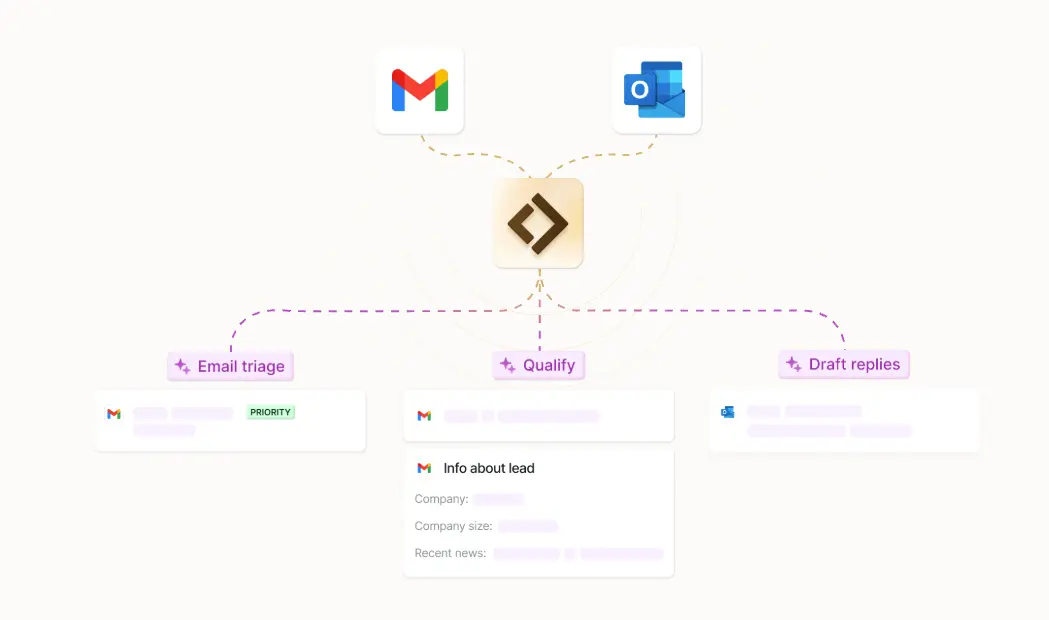
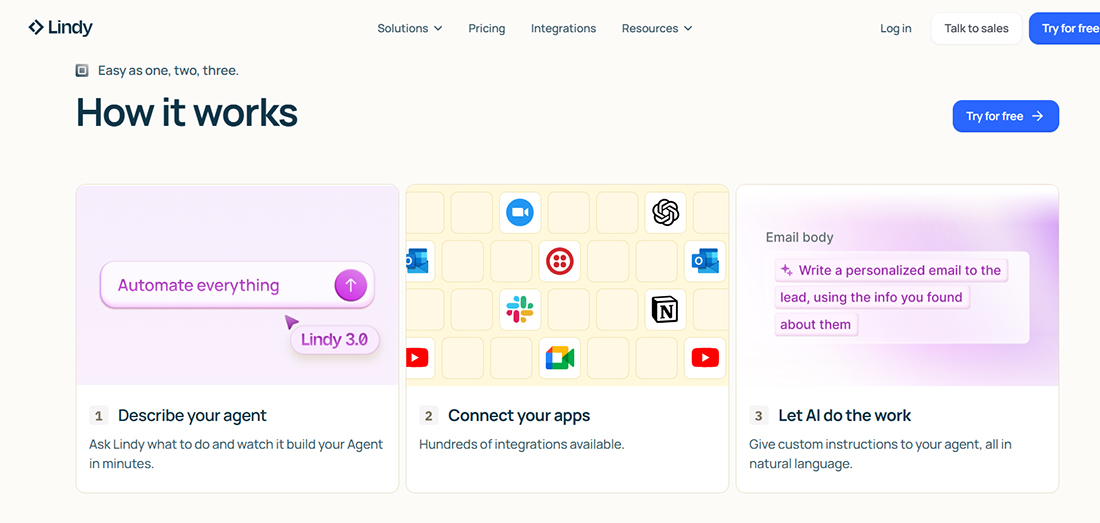
Lindy AI is a no-code platform for building autonomous AI work assistants. Trusted by over 400,000 professionals, it handles inbox management, meeting prep, scheduling, follow-ups, and cross-app workflows across Gmail, Outlook, Google Calendar, Slack, Notion, HubSpot, Salesforce, Teams, and Zoom.
The core architecture is a drag-and-drop agent builder with 4,000+ integrations. You describe what you want in natural language — "triage my inbox, draft replies in my voice, and schedule meetings with 15-minute buffers" — and Lindy constructs the workflow. No coding required, but the learning curve for complex multi-step agents is steeper than the marketing suggests.
Lindy operates continuously as a background process, not an on-demand chatbot. It monitors triggers — new emails, calendar events, Slack messages — and executes multi-step workflows without human supervision. The agent maintains persistent memory across interactions, remembering your brand voice, qualification criteria, and successful patterns.
The Communications Loop: Inbox to Meeting
Where Lindy truly shines is the complete communications loop — what a human chief of staff does in a single day, compressed into minutes:
Email Triage: Lindy reads incoming emails, categorizes by urgency and type, drafts replies in your voice for routine queries, flags complex issues for human review, and unsubscribes from newsletters automatically.
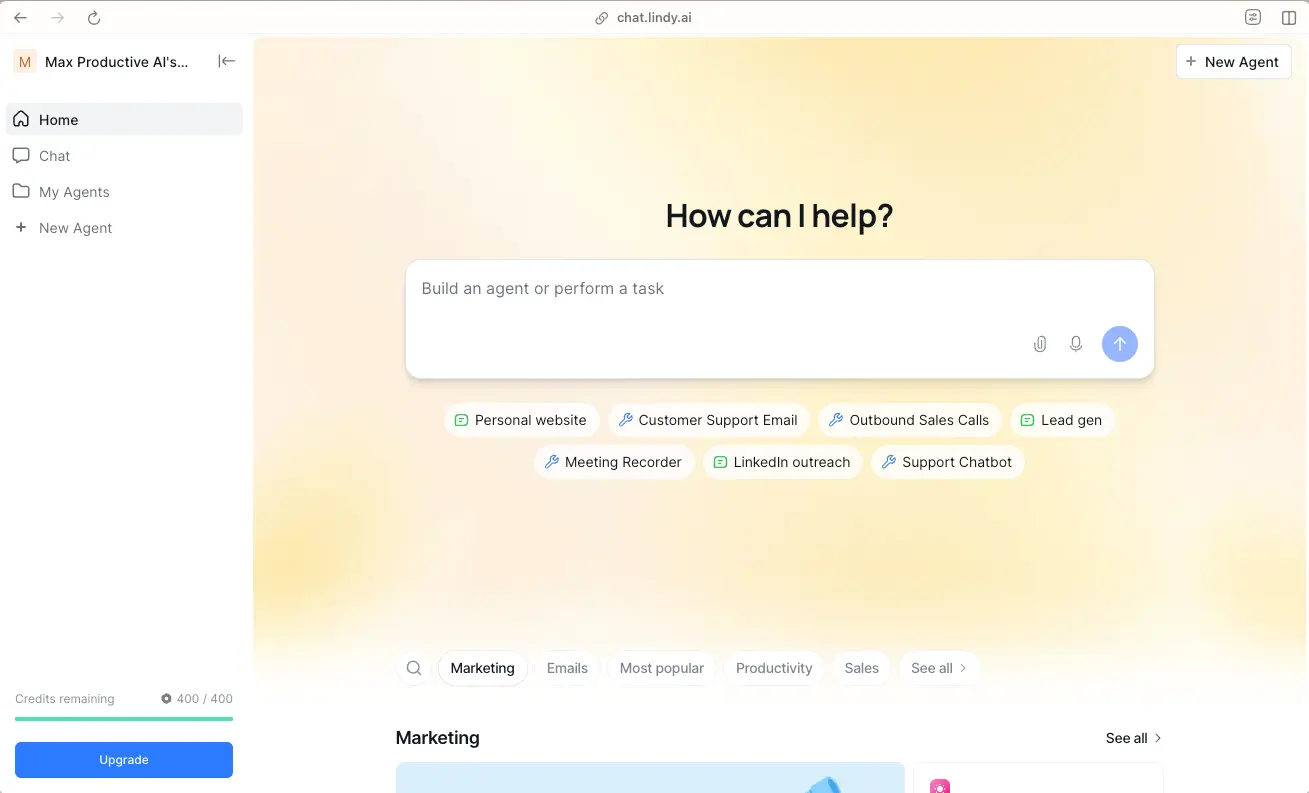
Meeting Intelligence: Before every call, Lindy prepares a brief using your calendar, email history, and connected context. It joins meetings (via Zoom integration), captures decisions, and sends follow-up emails with action items assigned to attendees.
Task Extraction: Commitments buried in emails — "I'll send the draft by Friday" or "Let's circle back next week" — are automatically extracted, added to your task list, and chased when deadlines approach.
Cross-App Delegation: From your phone via iMessage or SMS, you can delegate tasks without opening the dashboard. "Reschedule my 3 PM, find a slot next week, and notify the team." Lindy handles the rest.
Inbox Triage & Auto-Reply
Sorts, drafts, and sends replies in your voice. Unsubscribes from newsletters and auto-declines cold pitches.
Meeting Prep & Scheduling
Prepares briefs before calls, joins meetings, captures decisions, and sends follow-ups with action items.
Task Extraction & Chasing
Pulls commitments from emails, adds to task lists, and sends reminders before deadlines.
4,000+ Integrations
Native connections to Gmail, Outlook, Slack, Notion, HubSpot, Salesforce, Teams, Zoom, and more.
iMessage & SMS Delegation
Delegate tasks from your phone without opening the dashboard. Natural language commands.
Enterprise Security
SSO, SCIM, audit logs, and HIPAA compliance for teams with strict security requirements.
Pricing: The Credit Trap Nobody Talks About
Lindy's pricing structure is where the dream meets reality. The free tier offers 400 credits monthly — enough for light testing, not production use. Pro jumps to $49.99/month for 5,000 credits. But here's what the marketing doesn't emphasize: credits burn faster than advertised, and complex workflows consume exponentially more than simple ones.
The most common complaint across Trustpilot, Reddit, and third-party reviews is identical: "Expensive." With 42 mentions on review platforms, unpredictable credit pricing is Lindy's Achilles' heel. Users report credits burning 2-3x faster than the calculator suggests, especially when agents perform multi-step workflows with multiple app integrations.
Here's my actual spend from last month: $49.99 subscription + $187 in credit overages. For a tool marketed as a $50/month virtual assistant, I paid $237. That's still cheaper than a human chief of staff ($150K–$300K/year), but it's not the price on the landing page.
| Plan | Monthly Price | Credits | Best For | Real Cost |
|---|---|---|---|---|
| Free | $0 | 400/mo | Testing & learning | ~$0 (very limited) |
| Pro | $49.99/mo | 5,000/mo | Solo professionals | $50–$150/mo with overages |
| Team | Custom | Shared pool | Small teams | $200–$500/mo typical |
| Enterprise | Custom | Negotiated | Large organizations | Sales-led pricing |
Pros & Cons
✓ Comprehensive Advantages
- ✅ Complete communications loop: inbox, meetings, tasks, follow-ups in one platform.
- ✅ 4,000+ integrations with major business tools — no coding required.
- ✅ iMessage/SMS delegation lets you manage workflows from your phone.
- ✅ Persistent memory maintains context across all interactions and learns your patterns.
- ✅ Enterprise features: SSO, SCIM, audit logs, HIPAA compliance.
- ✅ No-code drag-and-drop builder for custom agent workflows.
- ✅ Significantly cheaper than a human chief of staff ($150K–$300K/year).
✗ Foundational Constraints
- ❌ Unpredictable credit consumption — the #1 complaint across all review platforms.
- ❌ Trustpilot rating of 2.4/5 with users flagging unexpected charges after free trials.
- ❌ Complex workflows have a steep learning curve — not truly "set and forget."
- ❌ No self-hosted option — cloud-only, which raises data privacy concerns for some.
- ❌ Less suited for research, coding, or content-heavy tasks — communications-focused only.
- ❌ Real monthly cost often 2-4x the advertised subscription price.
- ❌ Requires ongoing tuning and monitoring — agents can make mistakes that cost relationships.
💡 Real User Pulse: What Trustpilot Says
Lindy's Trustpilot rating sits at 2.4/5 — a significant red flag for a productivity tool. The complaints cluster around three themes: unexpected credit charges after free trials, credits burning faster than advertised, and difficulty canceling subscriptions.
One user summarized: "Simple agents fast; complex workflows have a learning curve. But the real issue is pricing transparency. I signed up for $49.99 and my first bill was $178. No warning, no clear explanation of where the extra credits went."
However, users who push past the pricing frustration consistently praise the core functionality. A sales director noted: "Once I understood the credit system and built simpler agents, Lindy saved me 2-3 hours daily. But I had to rebuild my workflows three times to get there."
The expert consensus from independent reviewers: Lindy is best for technical buyers who want to own the build. It's an agent platform sold as an assistant. If you want "turn it on and it works," look elsewhere.
Lindy AI vs Alfred vs Motion vs Reclaim
| Feature | Lindy AI | Alfred | Motion | Reclaim.ai |
|---|---|---|---|---|
| Chief of Staff Score | 16/25 | 23/25 | 12/25 | 10/25 |
| Email Coordination | 4/5 | 5/5 | 0/5 | 0/5 |
| Calendar Intelligence | 3/5 | 4/5 | 5/5 | 5/5 |
| Setup Friction | 1/5 | 4/5 | 2/5 | 3/5 |
| Pricing Transparency | 2/5 | 5/5 | 5/5 | 5/5 |
| Starting Price | Free (400 credits) | $24.99/mo | $19/mo | Free–$18/mo |
| No-Code Builder | Yes (4,000+ integrations) | No | No | No |
| Best For | Technical builders | Executives (out-of-box) | Calendar optimization | Focus time protection |
Bottom line: Alfred wins for out-of-box executive coordination with zero setup. Lindy wins for flexibility and custom workflows — if you have the technical appetite to build them. Motion wins for AI-scheduled time blocking. Reclaim wins for focus time protection at the lowest cost. For most executives, Alfred delivers the highest immediate ROI. For technical teams who want infinite customization, Lindy is the only choice.
Who Should Use Lindy AI?
Optimized Target Profiles: Technical professionals who want to build custom AI workflows without coding. Sales teams needing automated lead qualification and outreach sequences. Founders who handle their own inbox and want to reclaim 2-3 hours daily. Teams with complex multi-app workflows that no single tool handles. Operations managers who need cross-platform automation (Slack → CRM → Calendar → Email). Anyone comfortable with platform engineering and iterative agent tuning.
Alternative Directions: If you want zero-setup email coordination, Superhuman or Alfred ($24.99/mo) are better fits. For calendar-only optimization, Motion ($19/mo) or Reclaim.ai (free–$18/mo) are simpler. For meeting transcription and summaries, try Fathom or Fireflies.ai. And for the smartest meeting assistant, see our Granola AI review.
Expert Editorial Opinion
I've used Lindy AI for 90 days across two workflows: personal inbox management and a small team CRM automation. The experience was transformative when it worked and infuriating when it didn't — often within the same hour.
The inbox triage is genuinely impressive. Lindy learned my voice after roughly 50 examples and now drafts replies I send without editing about 60% of the time. The meeting prep is equally strong — I arrive at calls with context I didn't manually gather, and the follow-up emails with action items save me 15-20 minutes per meeting.
But the credit system is opaque and expensive. My first month, I burned through 5,000 credits in 11 days. The culprit wasn't volume — it was a poorly designed workflow that triggered multiple app integrations per email. One "triage + draft + schedule + notify Slack + update CRM" workflow consumed 45 credits per execution. I rebuilt it to batch operations and cut consumption by 60%, but that required 4 hours of debugging I hadn't budgeted for.
The comparison with Alfred is telling. Alfred scored 23/25 on the chief of staff benchmark versus Lindy's 16/25, primarily because Alfred works out of the box while Lindy requires building. But Lindy's 4,000+ integrations mean it can do things Alfred simply cannot — like updating HubSpot, notifying Slack, and scheduling in Google Calendar in a single workflow.
My honest recommendation? Start with Alfred or Reclaim if you want immediate relief. Graduate to Lindy only when you have specific multi-app workflows that simpler tools can't handle. And budget 2-3x the advertised price for your first month while you learn the credit system.
Final Verdict
Lindy AI is the most flexible no-code agent platform available in 2026. Its 4,000+ integrations, persistent memory, and complete communications loop make it capable of automating workflows that no competitor touches. When properly configured, it genuinely works while you sleep — triaging emails, booking meetings, and chasing follow-ups with minimal human intervention.
The 8.3 instead of 9.0 comes from the business model. The credit system is unpredictable, the Trustpilot rating (2.4/5) reflects genuine user frustration, and the real monthly cost often exceeds the advertised price by 2-4x. Lindy is a platform sold as an assistant — powerful for technical builders, frustrating for users who expect plug-and-play simplicity.
If you're comfortable building, iterating, and debugging AI workflows, Lindy will save you hours daily. If you want something that just works, start with Alfred. The "works while you sleep" promise is real — but only if you put in the work while you're awake first.
🔑 Related Keywords
🔗 Related Reads: For the best AI chief of staff tools ranked, see our Superhuman review and Granola AI analysis. Compare meeting tools: Fireflies.ai, Fathom, and our earlier Lindy coverage. For AI productivity broadly, check our full productivity guide.
❓ Exit Hook: If an AI agent could handle your entire inbox, schedule your meetings, and chase your follow-ups — but might occasionally make a mistake that costs a relationship — would you trust it to work while you sleep?
Comments
Post a Comment