


Livedocs Review 2026: The AI Data Notebook That Actually Does the Analysis
Livedocs review 2026: a reactive, AI-native notebook where an agent plans multi-step analysis, writes and runs real Python and SQL, builds charts, and leaves behind a reproducible workflow — built on DuckDB and Polars, Jupyter-compatible, and genuinely cheap to start with.
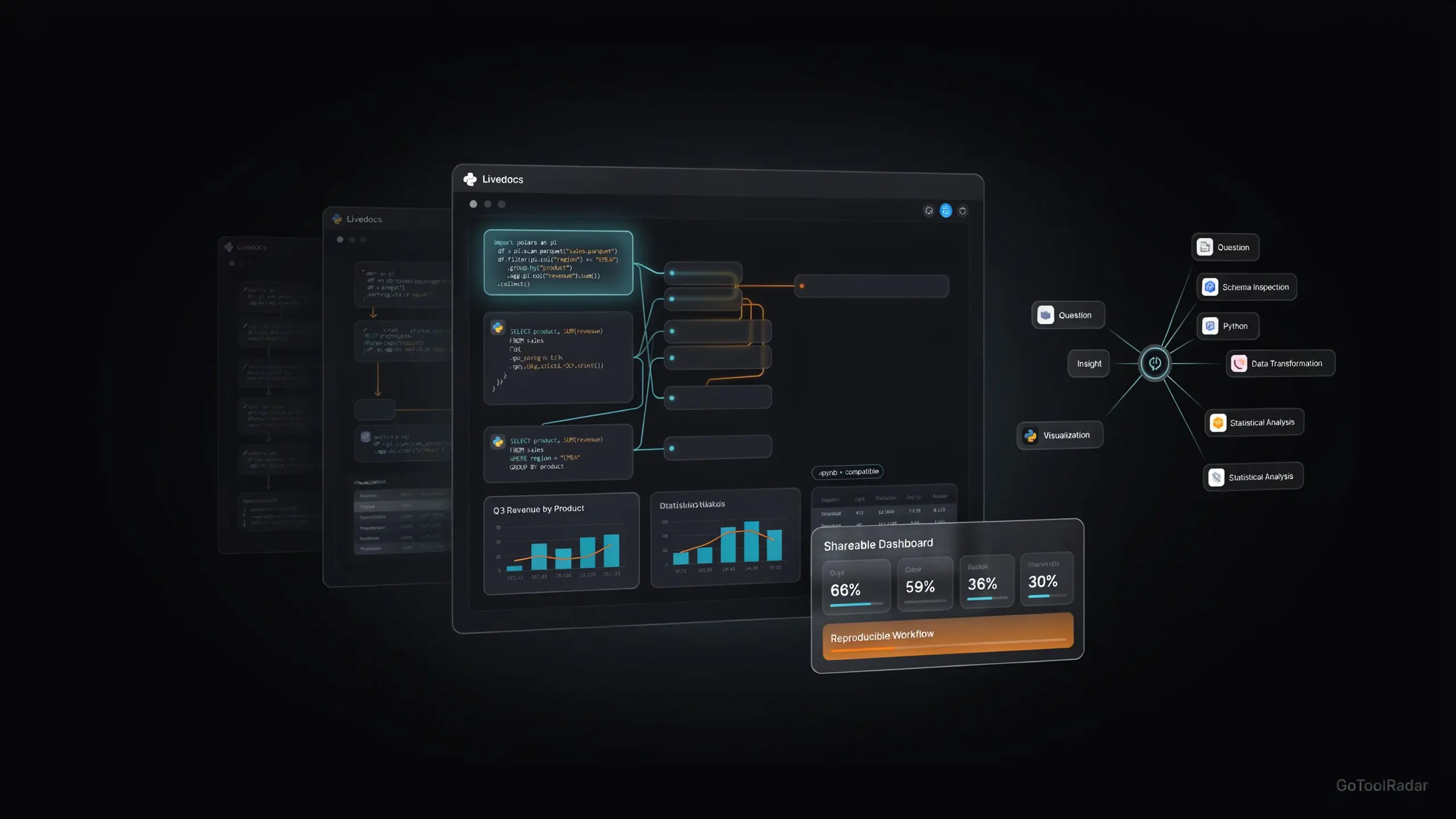
Livedocs review 2026: Jupyter taught a generation of developers to analyze data in cells, running code block by block and inspecting the output by hand. Livedocs is betting the next version of that idea shouldn't just display results — it should be able to generate them. Ask it "why did revenue drop in Q3?" and an agent plans the analysis, inspects your schema, writes and runs real SQL and Python, segments the data, builds charts, and explains what it found — inside the same reactive notebook a human can then edit, extend, or publish as a shareable app.
What makes this more than another "AI notebook" pitch is the history behind it. Livedocs existed for years as a no-code analytics platform connecting tools like Stripe and Google Analytics into custom reports. In 2026, the company rebuilt the product almost from scratch around a different premise entirely: data work should behave like a living, reactive system, not a linear script you rerun top to bottom every time one input changes.
The founder has described the long-term ambition in blunt terms elsewhere online: something like "Devin for data science" — an agent that doesn't just suggest code, but actually executes the work in a real environment. That's the thesis worth testing in this review, not just the feature list.

Pricing First — Why It Matters Here
| Plan | Price | Compute & Limits |
|---|---|---|
| Free | $0 | 3 notebooks, 1 user, 4GB RAM / 0.5 vCPU, $5 AI credits (no pay-as-you-go) |
| Builder | $15/mo | 5 notebooks, 8GB RAM / 2 vCPU, $5 AI credits then pay-as-you-go |
| Pro | $30/mo + $20/member | Unlimited notebooks, 16GB RAM / 4 vCPU, all data sources, scheduling, terminal |
| Custom | Contact sales | On-premise, SSO/custom auth, custom machine profiles, dedicated onboarding |
This is genuinely one of the more attractive entry prices in the AI data-notebook category — Deepnote's Team tier alone starts around $39/editor/month on annual billing, more than Livedocs' entire Pro base price. But read the fine print before assuming "$30/month" means unlimited AI: every paid plan includes $5 in AI credits, after which usage moves to pay-as-you-go pricing that scales with model choice, context size, and how many agent steps a given analysis takes. Subscription-plus-consumption is the norm across agentic products in 2026, and Livedocs isn't an exception to that pattern, however cheap the base price looks on the page.
Who Should Use It
Ideal user: a solo analyst, data scientist, or small startup team who wants an AI agent to actually execute analysis — write and run real SQL/Python, build charts, iterate on findings — rather than just suggest code snippets to copy elsewhere, and who's comfortable being an early adopter of a recently rebuilt product.
Look elsewhere if: you need mature enterprise governance (audit logs, single tenancy, BYO LLM) that competitors like Deepnote currently document more thoroughly, or you want fully open-source, self-hosted control — Livedocs itself points to Jupyter as the better fit for that specific need.
What's Actually Under the Hood
The single most technically interesting decision in Livedocs is reactive execution. A traditional notebook runs top to bottom: cell 1, then cell 2, then cell 3, and if you change something early, you rerun everything downstream by hand or risk stale results. Livedocs instead treats the notebook as a dependency graph — change one cell, and only the cells that actually depend on it re-run automatically, the same logic a spreadsheet uses when you update one cell and watch linked formulas update themselves.
Reactive dependency graph
Cells form a DAG, not a linear script. Edit one, and Livedocs recomputes only what's actually downstream of that change — with smart caching to avoid rerunning untouched work.
Python + SQL, mixed freely
No forced choice between a Python-first or SQL-first tool — both live in the same document, alongside pandas, Polars, NumPy, and DuckDB support.
DuckDB + Polars execution routing
Local files route through DuckDB, in-memory DataFrame work through Polars, and warehouse queries push computation into the database itself — chosen automatically based on the data source.
Multi-agent analysis
A main agent can plan multi-step work and spawn specialized sub-agents — a SQL agent, a stats agent, a visualization agent — rather than one model trying to do everything in one pass.
Canvas & data apps
Beyond a code-filled notebook, Canvas mode lets the agent build an actual interactive UI, and finished analyses publish directly as shareable dashboards or apps — no separate deployment step.
Jupyter compatibility
Import and export .ipynb files, so switching to Livedocs doesn't mean abandoning an existing notebook library — though full compatibility with every extension and magic command isn't guaranteed.
Livedocs vs. Jupyter vs. Deepnote vs. Hex
| Tool | Core identity | Best fit |
|---|---|---|
| Livedocs | AI-native, reactive, agent-executed | Analysts wanting an agent that actually runs the analysis, not just suggests it |
| Jupyter | Open-source, fully local/self-hostable | Users who specifically want full control and no vendor dependency |
| Deepnote | Collaborative cloud notebook, mature enterprise features | Teams needing audit logs, single tenancy, or BYO LLM today |
| Hex | Established data workspace + dashboards | Larger orgs wanting a more mature analytics ecosystem |
Pros & Cons
✓ Strengths
- ✅ Reactive dependency-graph execution is a genuine technical advance over linear notebook execution, not just a UI flourish
- ✅ A real multi-agent system that executes actual SQL/Python rather than only suggesting code to copy elsewhere
- ✅ Significantly cheaper entry pricing than comparable tools like Deepnote or Hex, with a usable free tier
- ✅ Model choice (GPT, Claude, Gemini, and others) lets you match model cost/capability to the task rather than being locked to one provider
✗ Weaknesses
- ❌ Comparative performance claims against named competitors come from Livedocs' own marketing, with no independent benchmark found to verify them
- ❌ Enterprise maturity trails competitors like Deepnote on specific items — audit logs, single tenancy, and BYO LLM aren't documented as available today
- ❌ AI usage isn't truly unlimited on any paid plan — $5 in credits, then pay-as-you-go consumption pricing
- ❌ A recently and substantially rebuilt product, which means less real-world track record than notebook tools with years of stable adoption
Expert Editorial Opinion
Start with what's genuinely good here, because it's easy to undersell. Reactive execution — treating a notebook as a dependency graph instead of a linear script — solves a real, well-known frustration with traditional notebooks: the moment you change an early cell and have to remember everything downstream that now needs rerunning. Borrowing that logic from spreadsheets and applying it to a Python/SQL environment is a smart, technically sound idea, not just a marketing label.
The multi-agent architecture is the more ambitious bet, and it's the right one for where data analysis tools are heading in 2026. A single model trying to plan, query, clean, segment, visualize, and explain in one pass tends to produce shallower results than specialized sub-agents handling pieces of that pipeline. Livedocs' willingness to spawn a SQL agent here and a visualization agent there, under a coordinating planner, mirrors the same architectural pattern showing up across serious agentic products this year — not a copy of any one of them, but a recognizable, sensible convergence.
Here's the part that needs saying plainly. Livedocs' own comparison pages use confident superlatives — faster than Hex, faster than Databricks — and a direct search for independent verification of those specific claims didn't surface one. That's not an accusation of dishonesty. It's simply the current state of the evidence: strong architecture, thin third-party proof. A reader deciding between Livedocs and an established competitor should weigh the technical design on its own considerable merits, and treat the comparative performance numbers as Livedocs' self-reported position in that debate, not a settled verdict.
The enterprise-readiness gap deserves a similarly direct note. For a solo analyst or small startup team, none of it matters much. For a larger organization evaluating Livedocs against Deepnote specifically, the absence of documented audit logs, single tenancy, and BYO LLM options today is a real, checkable difference — not a vague concern, a specific list of features competitors currently publish and Livedocs' public pages don't.
None of this changes the core verdict: the underlying idea is good, and the execution — reactive cells, real multi-agent execution, DuckDB/Polars routing, genuinely low entry pricing — backs that idea up credibly. What it changes is the confidence level a reader should bring to any specific superiority claim made on Livedocs' own marketing pages, versus the architecture itself, which stands on its own without needing those claims to be true.
Final Verdict
Livedocs earns genuine credit for a well-architected reactive, multi-agent data notebook — DuckDB/Polars routing, real code execution rather than suggestion, and notably low entry pricing for the category. The score reflects real caveats alongside that strength: comparative superiority claims against named competitors aren't independently verified, enterprise governance features trail more established rivals, and the AI-native version of the product is still relatively new. For individual analysts and small teams specifically, this is a promising, competitively priced tool worth real consideration — not yet a safe default for a large enterprise data team.
| Dimension | Weight | Score /10 | Why |
|---|---|---|---|
| Technical quality | 30% | 8.5 | Reactive dependency-graph execution and multi-agent analysis are genuine, well-reasoned technical advances, not marketing labels |
| Price-to-value | 25% | 7.5 | Significantly cheaper than comparable tools with a usable free tier, offset by credit-then-pay-as-you-go AI consumption pricing |
| Maturity & documentation | 20% | 6.5 | A substantially and recently rebuilt product with real but still-thin enterprise documentation relative to established competitors |
| Ceiling & flexibility | 15% | 8.5 | Model choice, multiple data-source connectors, scheduling, Jupyter compatibility, and app publishing give it a genuinely high ceiling |
| Honesty of positioning | 10% | 6.0 | Confident superiority claims against named competitors (Hex, Databricks) currently lack independent verification |
Weighted total: (8.5×0.30) + (7.5×0.25) + (6.5×0.20) + (8.5×0.15) + (6.0×0.10) = 7.6/10 — Score band: 7.0–7.9, "Competent but compromised — genuinely strong architecture at an attractive price, with comparative claims that deserve a healthy dose of skepticism."
❓ Frequently Asked Questions
🔗 Related ToolRadar Reviews
Official source: Livedocs. Given that comparative performance claims against named competitors aren't independently verified, test Livedocs directly against your own workload before relying on marketing comparisons to make a decision.
Comments
Post a Comment