


Supabase Review 2026: The Backend Behind the Vibe Coding Boom
An AI tool can draw your app in minutes, but someone has to store the users, guard the data, and pay the bill when it grows. Here is what Supabase really gives you, and where it quietly shifts the risk onto you.
📋 Table of Contents
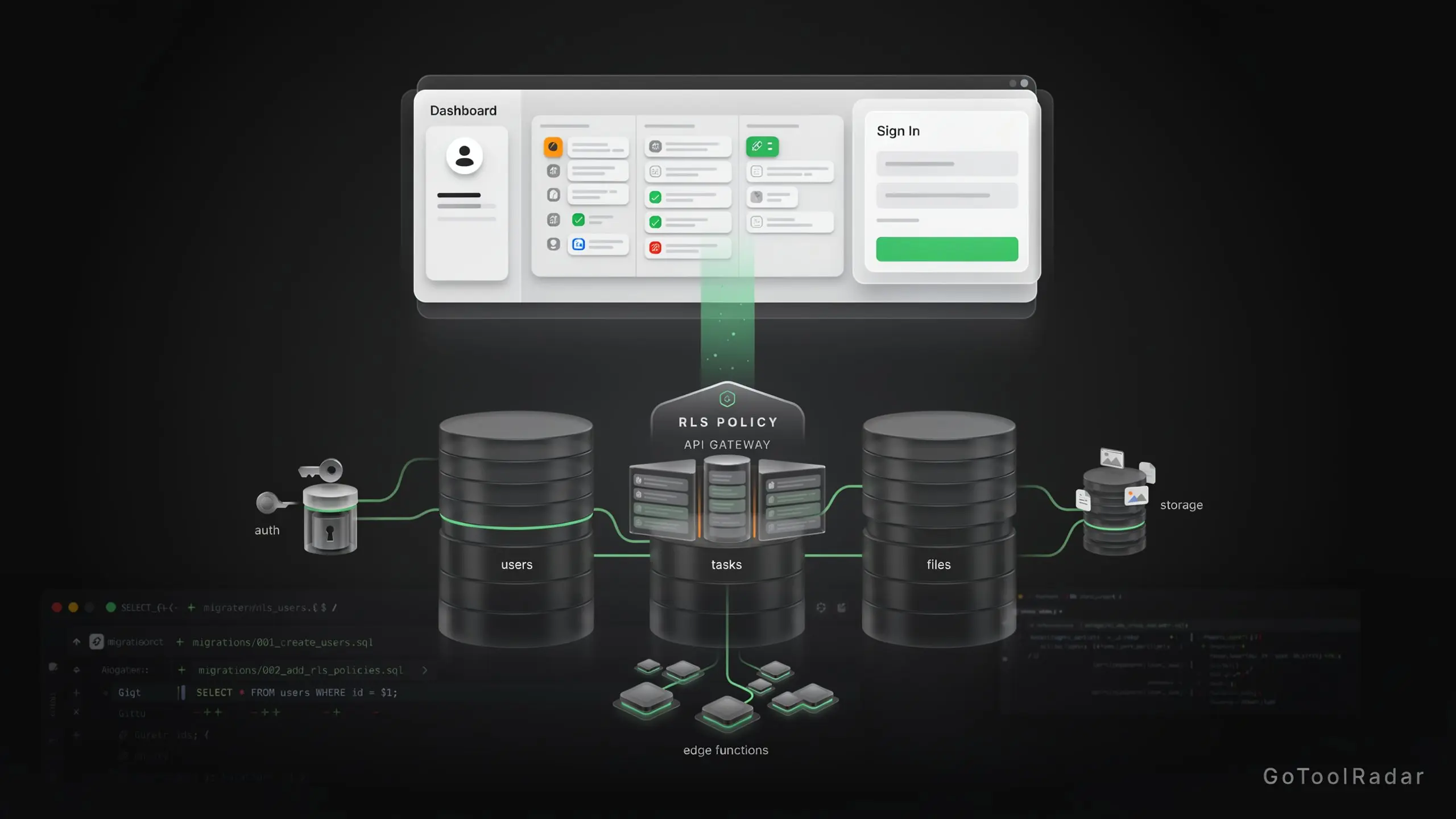
This Supabase review is about the part of an AI-built app that the demo never shows. When a tool like Lovable or Bolt generates a task manager in an afternoon, the pretty screens are the easy half. The hard half is a database that remembers people, a login that works, files that stay private, and permissions that stop one customer reading another's rows. Supabase is the platform most AI app builders reach for to cover that half, and it is built around PostgreSQL.
Our angle is simple. Supabase is mature, well documented, and genuinely free to start on, which is exactly why it deserves a harder look than "an open Firebase". We checked every plan limit against the official pricing page, read the security documentation, and traced how the platform connects to Lovable, Bolt, and coding agents, then scored it with the ToolRadar weighted formula. The short version: the backend is strong, but the first working demo is not the finish line, and the security work that remains is yours.

- Plan limits, overage rates, and add-on prices come from Supabase's official pricing page, read on October 15, 2026.
- Security guidance, the MCP server, AI tooling, and the October 2 "Select" announcements come from Supabase's own documentation and blog, with the status labels it uses (alpha, private alpha) quoted as written.
- Funding, exposure scans, and community reactions come from named third-party sources linked where used. We did not build or deploy an app on Supabase for this piece, so we publish no performance or latency figures.
What You Actually Get
PostgreSQL at the core
Your app's users, tasks, orders, and settings live in a real Postgres database, which is why the SQL you learn here transfers elsewhere.
Auth
Sign-up, sign-in, sessions, and social login providers are built in. The free plan covers up to 50,000 monthly active users.
Storage
Images and files, with access rules you define. Free includes 1 GB, Pro includes 100 GB.
Edge Functions
Server-side logic for the things that must never run in the browser, such as calling a payment API with a secret key. Free allows 500,000 invocations a month, Pro 2 million.
Realtime
Push live changes to connected apps when rows change, useful for chat, dashboards, and collaborative screens.
Vectors and pgvector
Store embeddings beside your normal data and search by meaning, covered in the AI section below.
MCP and Agent Skills
An official MCP server and portable skills let coding agents work with your project. Supabase's docs list plugin plus MCP support for Claude Code, Codex, Cursor, Gemini CLI, GitHub Copilot and VS Code, and MCP-only support for OpenCode, Goose, Kiro and others.
Here is a worked example, labeled as an architecture sketch and not a test. Say an agent builds you a paid task app. The tool writes the screens. Supabase stores users and tasks, Auth handles login, and row-level policies decide which person sees which task. An Edge Function handles anything needing a secret. A separate payment provider collects subscriptions, and your app records who is subscribed. Supabase does not give you a billing system for free; that integration is yours to build and test.
Pricing: What the Free Plan Really Covers
There is a genuine free plan, and for a prototype it is generous. The catch is in the details around it: two active projects, a database of 500 MB, and projects that pause after a week of inactivity. Prices below come from the official page.
- 2 active projects
- 50,000 monthly active users
- 500 MB database, 1 GB storage
- 5 GB egress, 500,000 Edge Function calls
- Paused after 1 week of inactivity, no backups, community support
- 100,000 monthly active users
- 8 GB database per project, 100 GB storage
- 250 GB egress, 2 million Edge Function calls
- $10 monthly compute credit (covers one Micro instance)
- Daily backups kept 7 days, never paused, email support
- Same usage allowances as Pro
- Daily backups kept 14 days
- SOC 2 and ISO 27001 included
- Priority email with SLAs, SSO via "Contact us"
- Custom limits
- 24×7 premium support and uptime SLAs
- Technical account management
Also note what the plan does not cover: the AI builder you use (Lovable, Bolt and others charge separately), calls to a language model, frontend hosting, email delivery, and the payment gateway. Those are all separate line items, so "free to start" is true while "free to run a business" is not.
Where Supabase Sits in Lovable, Bolt, and Agent Workflows
It is tempting to say every AI builder "runs on Supabase", but the picture is more careful than that.
Lovable. Lovable offers two backends: Lovable Cloud, which it manages, or a Supabase project you own. Supabase's own troubleshooting guide spells out the difference. A Lovable Cloud project does not appear in your Supabase Dashboard, you get no service role key, and you get no direct database URL. A project you connected yourself shows in your dashboard with key and database access. If you plan to take your app elsewhere later, that distinction matters on day one. Our Lovable review covers the builder side.
Bolt. Bolt's Bolt Cloud announcement names Supabase and Netlify as partners and lists databases, authentication, file storage and serverless functions as features then marked "coming soon" in a private beta. The article does not say Bolt's database is Supabase, and it does not explain how an existing Supabase project relates to Bolt Cloud, so we will not guess. If you use Bolt, check which backend your project actually uses; our Bolt.new review and the v0 vs Bolt vs Cursor comparison help with the frontend side.
Coding agents. Here the connection is direct. Supabase's MCP server lets an agent query data, run migrations, and deploy Edge Functions against your project. That power comes with a warning from the docs themselves: prompt injection is the main risk. Hidden instructions inside user content, a support ticket for instance, could trick the model into running harmful queries. Supabase wraps SQL results with defensive text but calls it "not foolproof". Its recommendations are to keep manual approval on, scope the server to one project, use read-only mode for unattended work, avoid pointing it at production data, and never hand the server to your customers. If you run agents like these, our comparison of Claude Code, Cursor and Copilot and the OpenCode review are the right companions.
So Supabase is rarely a rival to the builder. It is the layer underneath, and a reason a separate review makes sense even when a builder bundles its own backend.
Is Supabase Good for AI and RAG Apps?
For apps that search your own data, yes, and it keeps everything in one database. Supabase's AI documentation covers storing embeddings with pgvector, semantic search by meaning, keyword search, and hybrid search that combines both. Edge Functions can generate embeddings with open-source models or call a hosted model API, and the docs list integrations with OpenAI, Hugging Face, LangChain, LlamaIndex, and Amazon Bedrock.
One honest caveat. The main AI page does not describe retrieval-augmented generation in depth; it points to a "RAG with Permissions" guide and several examples. In practice, you would store documents and embeddings in Postgres, retrieve the relevant passages for a question, and send them to a model. The embeddings and the answers may come from an outside provider, which adds a cost Supabase's price does not include. The permissions angle is the interesting part: your row-level rules can decide whose documents a search is allowed to return.
What Is Still Alpha: The October 2026 Announcements
On October 2, 2026, Supabase published its "Select" announcements, aimed squarely at agent-driven development. They are exciting and also uneven in maturity, so read the labels.
- Agent-ready local development: local Supabase running as native processes without Docker, one instance per directory. The post says: "It's in alpha today, off by default."
- Declarative Schemas 2.0: an agent edits SQL schema files in your repository and the CLI's new diff engine, pg-delta, generates the migration. New projects from
supabase inituse it by default. The post gives no status label. - Config in code: auth providers, API limits and storage buckets can live in
config.toml, withsupabase config pullto bring dashboard changes back. No status label given. - Supabase Compute: long-running services and agents in the same project as your database. Status: "private alpha", with a waitlist, so it is not generally available.
- An MCP server for your own app: distinct from the official MCP server. It lets your users' agents act inside your app as the signed-in user, with your row-level policies still deciding what they can reach. It requires asymmetric signing keys and the Supabase Auth OAuth server.
Treat these as a direction of travel, not features to build a business on this week. The sensible reading is that schema-in-Git and config-in-code are the practical wins, because they make database changes reviewable the way code is.
The Real Risk: An AI-Generated App That Is Not Secure
This is the section to read twice. Supabase exposes your tables through an API, and Row Level Security (RLS) is what decides which rows each user can see. Its documentation is blunt: a table without RLS is readable and writable by any role with a grant on it. Once RLS is enabled, no data is accessible through the API until you write policies, and policies do not remove grants, so revoking them is a separate step.
Three mistakes recur.
- Forgetting RLS. The table works in your demo and quietly serves everyone's data.
- Exposing a secret key. A secret key reaches the database through the
service_rolePostgres role, which bypasses RLS. The docs say never to use it in the browser or expose it to customers. It bypasses policies only when the request carries no user token; with a user token, that user's policies apply. - Trusting generated policies blindly. A policy can look right and still miss an operation or a role. The docs recommend writing a test per table covering allow and deny cases for select, insert, update and delete, for both anonymous and signed-in roles.
How common is the problem? Third-party figures exist, with caveats. A January 2026 scan reported on Hacker News examined 20,052 URLs from five indie launch directories and claimed an 11.04% exposure rate, including 2,325 critical exposures mostly from service_role keys; that is the scanner's own report, not an audited study. A separate write-up of researcher Matt Palmer's CVE-2025-48757 finding says 170 of 1,645 Lovable-built apps, about 10.3%, exposed data because RLS was off, per BuildMVPFast. A security vendor's analysis adds that the root cause was insecure defaults in the builder and not a flaw in Postgres, while some parties argue customers still own correct RLS setup. Those are different parties blaming different layers, and the reasonable takeaway is that responsibility is shared and you cannot assume the tool did it.
The same lesson applies to the agent layer. Our piece on security holes in AI agents covers why giving a model database access deserves the same caution.
Pros and Cons
✓ What works
- ✅ A real PostgreSQL database, with SQL knowledge that carries over.
- ✅ Auth, storage, functions, realtime, and vectors under one roof.
- ✅ A free plan with 50,000 monthly active users, enough for real prototypes.
- ✅ Clear, published overage rates and a default spend cap on Pro.
- ✅ Documentation that tells you plainly where the risks are, including RLS testing and MCP prompt injection.
- ✅ Wide agent support through MCP, plugins and portable skills.
✗ What to watch
- ❌ Security defaults are your job: RLS and key handling are easy to get wrong.
- ❌ The free plan pauses after a week of inactivity and has no backups.
- ❌ Costs grow in layers: extra projects, compute, egress, and separate AI, hosting and payment bills.
- ❌ Lovable Cloud projects give no direct database or service role access.
- ❌ Several new agent features are alpha or private alpha.
How It Compares With Firebase, Appwrite, and Convex
These alternatives are for comparison by need, not the outcome of a head-to-head benchmark. We used each vendor's own pricing page; where a page did not show plan details, we say so instead of filling the gap.
| What we checked | Supabase | Firebase | Appwrite | Convex |
|---|---|---|---|---|
| Free entry | Free plan: 2 active projects, 50k MAU, 500 MB DB | Spark no-cost plan; no Cloud Functions or phone auth on Spark | Serverless databases carry a $0 fixed compute fee, with reads and writes counted against a plan quota | Free and Starter, pay as you go |
| Paid entry | Pro from $25/month | Blaze, pay as you go; eligible new accounts get $300 credit | Dedicated databases from $10/month; plan prices not shown on the fetched page | Professional $25 per developer per month |
| Pricing style | Plan plus usage overage | Plan plus Google Cloud rates | Per-database compute tiers | Per developer plus usage |
| Notable detail | $10 compute credit on Pro | Phone auth billed per SMS on Blaze | $10 monthly compute credit for databases, plan applicability not stated | Open source and self-hostable per its pricing page |
The practical split is about data shape and team. Choose Supabase when relational data and SQL are a natural fit, Firebase when you want Google's stack and document storage, Convex when a reactive developer experience is the point, and Appwrite when its model of per-database compute suits you. For deployment alongside a backend, see our look at Kuberns. Always confirm current limits on each vendor's page, because Appwrite's plan table did not load for us.
💡 What Developers Said on Hacker News
The first comment explains a distinction that trips beginners: the public anon key is supposed to ship in browser code, and what must never ship is the secret key. The second one names the real weakness, which is that the people most likely to leave RLS off are the least likely to run a scanner. The same thread also drew a question about how the scanner decided a project counted as "vibe coded", a fair challenge to its headline number. We read both comments as support for the earlier point: the platform documents the rules clearly, but the audience arriving through AI builders often has not read them.
Who Should Use Supabase
A strong fit: builders of SaaS and AI apps who want a real relational backend, users of Lovable, Bolt, or coding agents who are willing to learn RLS properly, and teams that want database changes tracked in Git.
Look elsewhere if: you want a backend with security handled for you and no policy writing, you need a document-first or reactive-first model, or you cannot spend time testing permissions before launch. In that case compare the Firebase, Appwrite and Convex options above, or keep the backend your builder manages.
Expert Editorial Opinion
Supabase is the rare tool whose weakness is also its marketing success. The platform is now large: it announced a $500 million Series F at a $10.5 billion valuation on June 8, 2026, led by GIC, and says more than 9 million developers use it, according to Orrick's announcement. That scale is a real signal of maturity. It also means a flood of first-time builders arriving through AI tools, which is where the exposure numbers above come from.
Because this is an established tool, the right question is not "does it work" but "what does the move from prototype to production cost". The honest answer has three parts. Money: a $0 to $25 jump, then extra projects, compute, egress and overage. Time: writing and testing policies for every table. And attention: keys, agent permissions, and backups. The free plan is built to get you started, not to run unattended, which is why a plan that pauses after a week of inactivity and keeps no backups should never hold anything you cannot lose.
Now the pricing gap. Between the free plan and Pro sits a sharp divide: backups, no pausing, email support and 100,000 monthly active users arrive together at $25. That is a sensible line for a business and an awkward one for a hobbyist with a project that sleeps between visits. Team at $599 is a different animal; its main additions are 14-day backups, SOC 2 and ISO 27001, and priority support, so most small teams will never need it.
Would the product be worth it if the free tier vanished tomorrow? For a relational app with real users, probably yes: Pro's allowances are large and the costs are published, which beats a surprise invoice. For a weekend experiment, no, and that is exactly the case the free plan exists to serve.
The October announcements show where the company is headed: backends an agent can read, change, and test from your repository. We like schema-in-Git because it makes database edits reviewable. We are cautious about leaning on anything labeled alpha. And the best advice we can give a reader comes from Supabase's own documentation, not ours: enable RLS, revoke grants, write a policy per operation, and test allow and deny before you ship.
Final Verdict
Supabase lands in the Strong band (8.0 to 8.9): recommended, with named caveats. It is the most credible backend to pair with AI app builders, with real Postgres, a usable free plan, published overage rates, and honest security documentation. The caveats are that RLS and key handling are your responsibility, costs grow in layers, and the newest agent features are alpha.
| Dimension | Weight | Score /10 | Why |
|---|---|---|---|
| Technical quality | 30% | 9.0 | Real PostgreSQL with auth, storage, functions, realtime and vectors in one platform. |
| Price-to-value | 25% | 8.4 | A free plan and clear overage rates, offset by layered costs and a free tier that pauses. |
| Maturity & documentation | 20% | 9.0 | Large, well-funded, and open about risks; some new features remain alpha. |
| Ceiling & flexibility | 15% | 9.0 | Portable SQL and wide agent support; Lovable Cloud projects lack direct database access. |
| Honesty of positioning | 10% | 7.8 | Docs are candid, but "build fast" marketing glosses over the security work left to you. |
Final score = (9.0 × 0.30) + (8.4 × 0.25) + (9.0 × 0.20) + (9.0 × 0.15) + (7.8 × 0.10) = 2.70 + 2.10 + 1.80 + 1.35 + 0.78 = 8.73.
Comments
Post a Comment