



Linfo.ai Review 2026: The AI Mind Map Extension That Turns Any Article Into a Visual Summary
One click converts articles, papers, and YouTube videos into structured mind maps and AI summaries — right inside your browser. Emoji-based annotations. Chrome, Arc, and Edge.
- What Is Linfo.ai and Why Does It Matter?
- Key Features: From Article to Mind Map in One Click
- Pricing: Free Tier vs Paid Plans
- Pros & Cons: The Honest Breakdown
- Real User Pulse: What Chrome Web Store Reviewers Say
- Linfo.ai vs Competitors: The Comparison
- Who Should Use Linfo.ai (And Who Shouldn't)
- Expert Editorial Opinion
- Final Verdict
- Related ToolRadar Reviews
- Frequently Asked Questions
Here is a problem that anyone who reads for work knows intimately. You open a research paper, a long-form article, or a dense blog post. Twenty minutes in, you realize you have been reading but not retaining. The structure of the argument is unclear. The relationships between ideas are buried in paragraphs. You have consumed the words without comprehending the architecture. Now you have a choice: re-read slowly, take manual notes, or move on and hope the gist was enough.
Linfo.ai was built to break this cycle. It is a Chrome extension that converts any webpage or YouTube video into a structured mind map and AI summary, powered by ChatGPT and Claude, directly inside your browser. Instead of passively reading linear text, you interact with a visual hierarchy that makes the relationships between ideas explicit. You can annotate key points with emoji reactions, customize the content structure to match your learning style, and save everything to a personal collection with one click. Updated June 2026, this review examines whether Linfo.ai's mind map approach genuinely improves comprehension or simply adds a pretty layer to standard AI summarization.
What Is Linfo.ai and Why Does It Matter?
Linfo.ai occupies a specific niche in the crowded AI summarization market: it does not just condense content faster — it reorganizes it into a structure that makes the relationships between ideas visible. The core mechanism is a browser extension that sits quietly in your toolbar until you need it. Click the icon on any article, blog post, academic paper, or YouTube video, and within seconds the page is transformed into a visual mind map with a hierarchical summary alongside it.
The technical implementation is straightforward but effective. The extension extracts the page content, sends it to ChatGPT and Claude APIs for analysis, and renders the output as an interactive mind map directly in the browser tab. The mind map is not static — you can customize the hierarchy, collapse and expand branches, and navigate back to the original source at any point by clicking through to the relevant section. This is not a PDF export or a separate app — it is an overlay that lives where you already read.
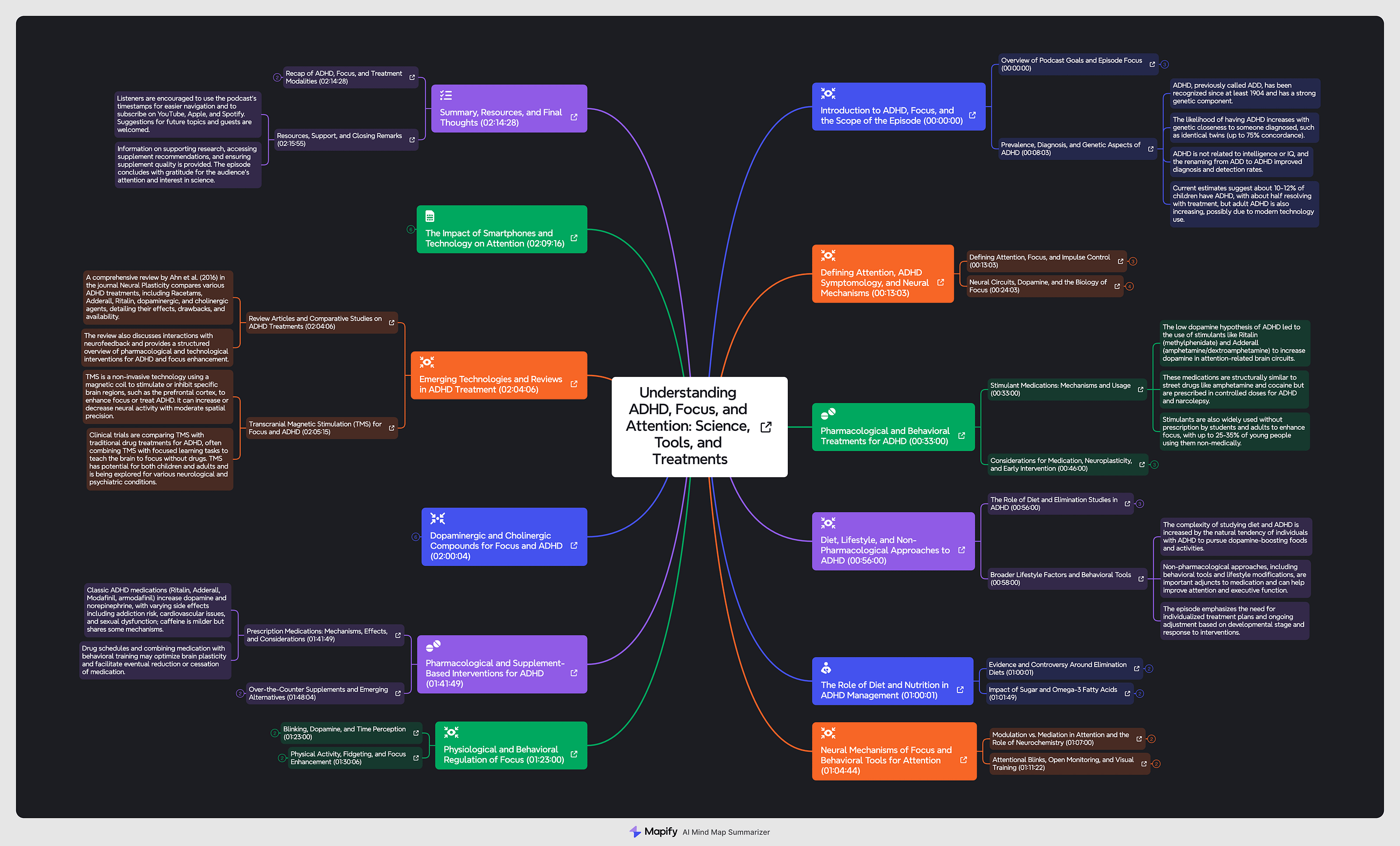
What distinguishes Linfo.ai from simple summarizers is its implicit model of cognition. A five-bullet summary tells you what the article said. A mind map shows you how the ideas connect — which claims support which conclusions, which sections are foundational and which are elaboration. For researchers synthesizing multiple sources, this structural visibility is often more valuable than the summary itself. The emoji annotation system reinforces this by letting readers mark insights at the point of comprehension rather than at the end of the document, preserving the context of why something felt important.
Key Features: From Article to Mind Map in One Click
One-Click Mind Map Generation
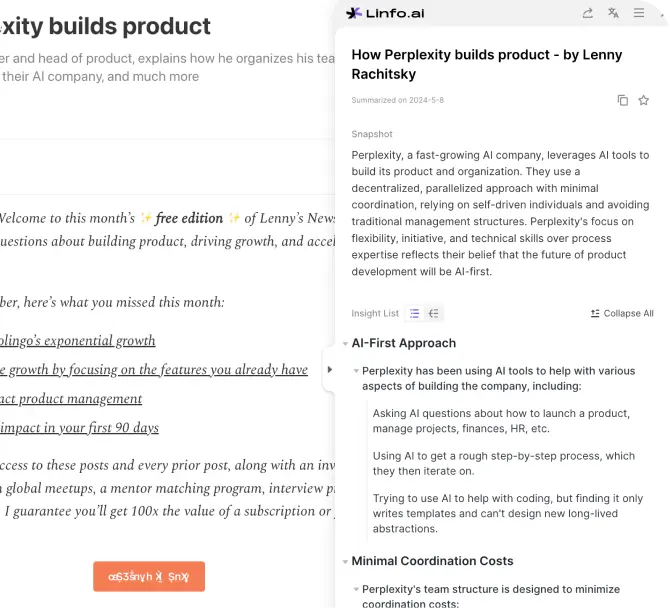
Converts any article, blog post, paper, or YouTube video into a structured visual mind map instantly, without leaving the page. The hierarchy reveals how ideas connect rather than just what they say — a fundamentally different cognitive output than linear summarization.
Structured AI Summaries
Turns lengthy content into concise, organized summaries with a single click. Extracts the most important points and presents them in a logical hierarchy that mirrors the original argument's architecture, not just its content.
Emoji-Based Insight Collection
A uniquely lightweight annotation system: react with an emoji to any key point while reading to save it to your personal collection without breaking your reading flow. By the time you finish an article, you have a meaningful, emotionally tagged set of saved insights.
Personalized Content Hierarchy
Customize how the mind map is structured to match your own reading preferences and learning style. Rather than accepting a one-size-fits-all output, you can rearrange branches, emphasize sections, and build a map that reflects how you think.
Intelligent Link Processing
Paste one or more URLs and the platform automatically visits the pages, extracts titles, authors, publication dates, core summaries, key images, and relevant tags without manual reading. Batch-process multiple sources in a single workflow.
Multi-Browser Support
Works with Chrome, Arc Browser, and Microsoft Edge, covering the primary Chromium-based browsers that most professionals use daily. The extension is available from the Chrome Web Store with a verified publisher badge.
Pricing: Free Tier vs Paid Plans
| Plan | Price | What's Included |
|---|---|---|
| Free | $0 | Always-on extension, click-to-source navigation, 10 free link analyses per week, save and reaction summary features, share summary results |
| Basic | $11.99/mo | Everything in Free plus higher monthly quota for link analysis, deeper keyword extraction, extended history retention, and team collaboration features |
| Pro | Custom | Unlimited article, PDF, and YouTube summaries, priority to new features, priority support, fastest generation model, priority queue for faster output |
The pricing structure is straightforward and competitive. The free tier at 10 analyses per week is genuinely useful for light individual use — enough to process a couple of articles daily without hitting the cap. The $11.99 Basic plan unlocks the volume and depth that researchers and professionals actually need, with team collaboration as a differentiator for small groups. The Pro tier's custom pricing suggests enterprise or heavy-use negotiation, which is reasonable for a tool that processes content through third-party LLM APIs with real per-request costs.
The pricing gap analysis is worth noting. At $11.99 per month, Linfo.ai sits in the middle of the AI summarization market — cheaper than premium research tools like Perplexity Pro at $20/month, but more expensive than free alternatives like browser-native reading modes or basic ChatGPT paste-and-summarize workflows. The value proposition hinges on whether the mind map output and emoji annotation system justify the cost over simpler free options. For users who process high volumes of structured content and need retention, the answer is likely yes. For casual readers who just want the gist, the free tier or manual methods may suffice.
Try Linfo.ai Free →Pros & Cons: The Honest Breakdown
✓ What Linfo.ai Gets Right
- ✅ Visual mind maps improve comprehension — seeing idea relationships beats linear summaries for retention and synthesis
- ✅ One-click workflow — no copy-pasting, no separate apps, no context switching. The extension lives where you read
- ✅ Emoji annotation is genuinely useful — lightweight enough not to interrupt flow, structured enough to produce meaningful collections
- ✅ Customizable hierarchy — adapts to your learning style rather than imposing a single structure
- ✅ Verified Chrome Web Store publisher — clean compliance record, no policy violations, 4.3-star rating
- ✅ Multi-browser support — Chrome, Arc, and Edge cover most professional workflows
✗ Where Linfo.ai Falls Short
- ❌ English-only — no multilingual support, limiting usefulness for international researchers and non-English content
- ❌ Limited to text-heavy pages — fails or produces weak output for login-required pages, heavy JavaScript sites, or non-YouTube video platforms
- ❌ No API access — cannot integrate into custom research pipelines, note-taking systems, or automation workflows
- ❌ No community or shared library — every user starts from zero with no benefit from others' organized insights
- ❌ No export to knowledge tools — mind maps cannot be exported to Miro, Notion, or Obsidian for deeper management
- ❌ Dependent on third-party LLMs — output quality, latency, and availability tied to ChatGPT and Claude APIs that Linfo.ai does not control
💡 Real User Pulse: What Chrome Web Store Reviewers Say
Linfo.ai vs Competitors: The Comparison
| Feature | Linfo.ai | Perplexity | ChatGPT + Browser |
|---|---|---|---|
| Output Format | Mind map + summary | Cited Q&A | Text summary |
| Visual Structure | Interactive hierarchy | None | None |
| Annotation System | Emoji reactions | Collections | None |
| Source Citations | Click-to-source | Inline citations | Manual |
| Pricing | Free / $11.99/mo | Free / $20/mo | Free / $20/mo |
| Language Support | English only | Multilingual | Multilingual |
The comparison reveals Linfo.ai's unique position clearly. Against Perplexity, it wins on visual structure and annotation but loses on source citation depth and multilingual coverage. Perplexity is the better research tool for fact-checking and exploration; Linfo.ai is the better comprehension tool for understanding and retaining structure. Against the manual ChatGPT + browser workflow, Linfo.ai wins on convenience, visual output, and annotation features but loses on flexibility — you can ask ChatGPT anything, while Linfo.ai is optimized for a specific pipeline. The ideal stack for heavy researchers may actually include both: Perplexity for discovery and verification, Linfo.ai for comprehension and retention.
Who Should Use Linfo.ai (And Who Shouldn't)
Ideal for: Students, researchers, academics, and professionals who process large volumes of online content and need to retain structural understanding, not just surface facts. Particularly valuable for PhD candidates synthesizing literature reviews, journalists researching complex topics across multiple sources, and analysts who need to build mental models from scattered information. The mind map output is most powerful for content with clear argumentative or hierarchical structure — academic papers, long-form journalism, technical documentation, and analytical blog posts. Also ideal for visual learners who struggle with linear text retention.
Look elsewhere if: You primarily consume content in languages other than English, since Linfo.ai currently supports English only. You need deep source citation and fact-verification, where Perplexity's inline citations are superior. You want to integrate summarization into custom automation pipelines or note-taking systems, since there is no API access. You prefer simple, fast gist extraction without visual overhead — a basic ChatGPT summary may be faster and sufficient. You work primarily with video content beyond YouTube or pages requiring login, where Linfo.ai's extraction may fail.
Expert Editorial Opinion
The AI summarization space has a problem that most tools in it have not yet solved: speed and comprehension are not the same thing. Getting the gist of an article faster does not mean understanding it more deeply, and the history of research suggests that passive reading of summaries — even good ones — produces significantly weaker retention and recall than active engagement with structure. Linfo.ai's mind map approach is interesting precisely because it implicitly understands this distinction. A mind map is not a shorter version of an article; it is a different cognitive representation of the same information — one that forces the reader to see relationships, hierarchies, and gaps that linear text obscures.
The emoji annotation system reinforces this insight by giving readers a micro-interaction at the point of insight rather than at the end of the document. These are small design decisions, but they reflect a more sophisticated model of how people actually absorb information than the typical "here is a five-bullet summary" approach. The limitation — and it is a real one — is that mind maps need to be worked with, not just generated. A reader who glances at the output and moves on gets very little benefit over a standard summary. The users who will get disproportionate value from Linfo.ai are those who treat the mind map as a starting point for their own synthesis, not as the synthesis itself.
The pricing at $11.99 per month is reasonable but not trivial. In a market where ChatGPT and Claude offer free tiers with strong summarization capabilities, Linfo.ai must justify its cost through the mind map and annotation features. For researchers and professionals who process enough content to hit the free tier's 10-analysis weekly cap, the upgrade is a clear value. For casual readers, the free tier is generous enough to test whether the visual approach actually improves their comprehension before committing. The biggest risk to Linfo.ai's long-term position is not competition from other summarizers but the possibility that major browsers or AI platforms build similar mind map visualization natively — which would collapse the moat around this specific feature set.
Final Verdict
Linfo.ai earns a 7.3 out of 10 for delivering a genuinely differentiated approach to AI summarization through interactive mind maps and lightweight emoji annotations. The visual hierarchy improves comprehension for structured content, the one-click workflow eliminates friction, and the free tier is generous enough for meaningful trial. The deduction reflects real limitations: English-only support, no API for integrations, no export to knowledge management tools, and dependence on third-party LLM APIs for quality and availability. It is not a replacement for research tools like Perplexity or manual deep reading, but it is a valuable companion for anyone who processes enough long-form content to need structural visibility. For researchers, students, and analysts drowning in articles, the $11.99 monthly investment is justified. For casual readers, the free tier is worth installing today. Updated June 2026.
🔗 Related ToolRadar Reviews
More tools from AI Productivity
- I Let AI Take Over My Inbox for 30 Days — Here's What Actually Happened
- Can Humata.ai Actually Read a 500-Page PDF? We Tested It
- Is Reflect the Smartest Note-Taking App in 2026?
- Stop Taking Meeting Notes — Fireflies.ai Review 2026
- Readwise Review 2026: Can This App Actually Improve Your Reading?
- Fabric App Review 2026: AI Second Brain or Overhyped Folder?
- I Replaced My Entire Note-Taking Stack With AI — Here's What Survived
- Your Meetings Are Forgettable — Fathom Review 2026
❓ Frequently Asked Questions
When was the last time you actually remembered what you read?
Linfo.ai is free to try, takes 30 seconds to install, and might be the difference between reading and understanding. The only question is whether you are ready to see the structure behind the words.
Try Linfo.ai Free →
Comments
Post a Comment