



How Pushary Lets You Walk Away From Your Terminal While Your AI Agent Works
A review of the push-notification control panel that turns your phone's lock screen into an approval gate for Cursor, Claude Code, Codex, and any MCP agent.
Reviewed by the ToolRadar Editorial Team · Independent analysis based on official documentation and verified user feedback
AI coding agents have crossed a threshold in 2026. Tools like Claude Code, Cursor, and Codex now run long, semi-autonomous tasks that can take anywhere from ten minutes to several hours. The problem is not the agent's capability — it is the human bottleneck. You kick off a refactor, switch to Twitter for "one minute," and return forty minutes later to discover the agent finished thirty-five minutes ago and has been sitting idle, waiting for a yes-or-no answer it needed to proceed. That gap between "agent done" and "human aware" is where Pushary positions itself.
Pushary is a push-notification platform built specifically for AI coding agents. It intercepts tool-use events before they execute, checks your permission rules, and routes approval requests to your phone as push notifications. You tap approve or deny from your lock screen, the answer flows back to the agent, and the round trip takes seconds. The platform supports Claude Code, Cursor, Codex, Windsurf, Lovable, Hermes, and anything that speaks MCP. Setup is a single npx command and a QR code scan. Updated July 2026.
What Pushary Does
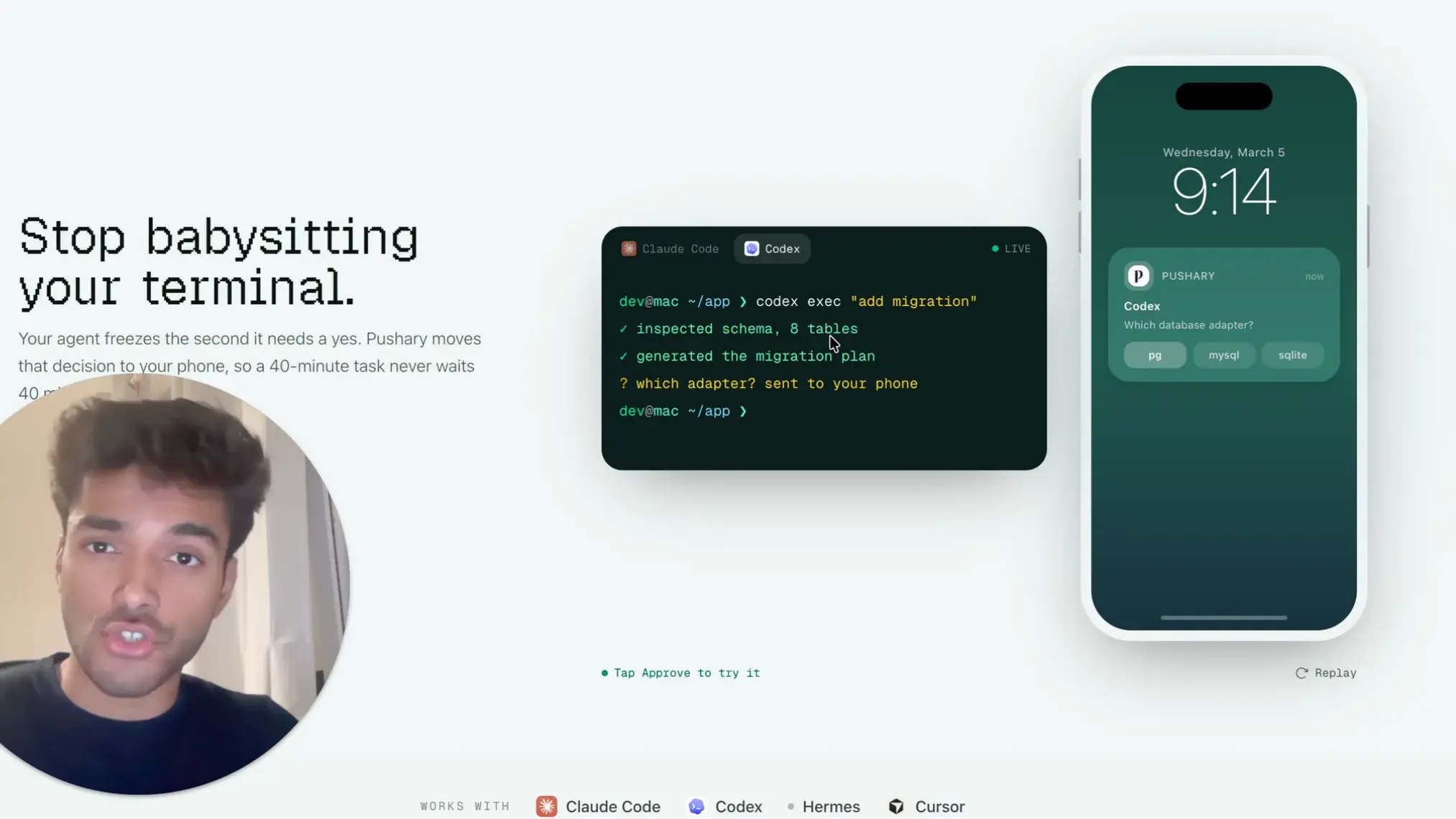
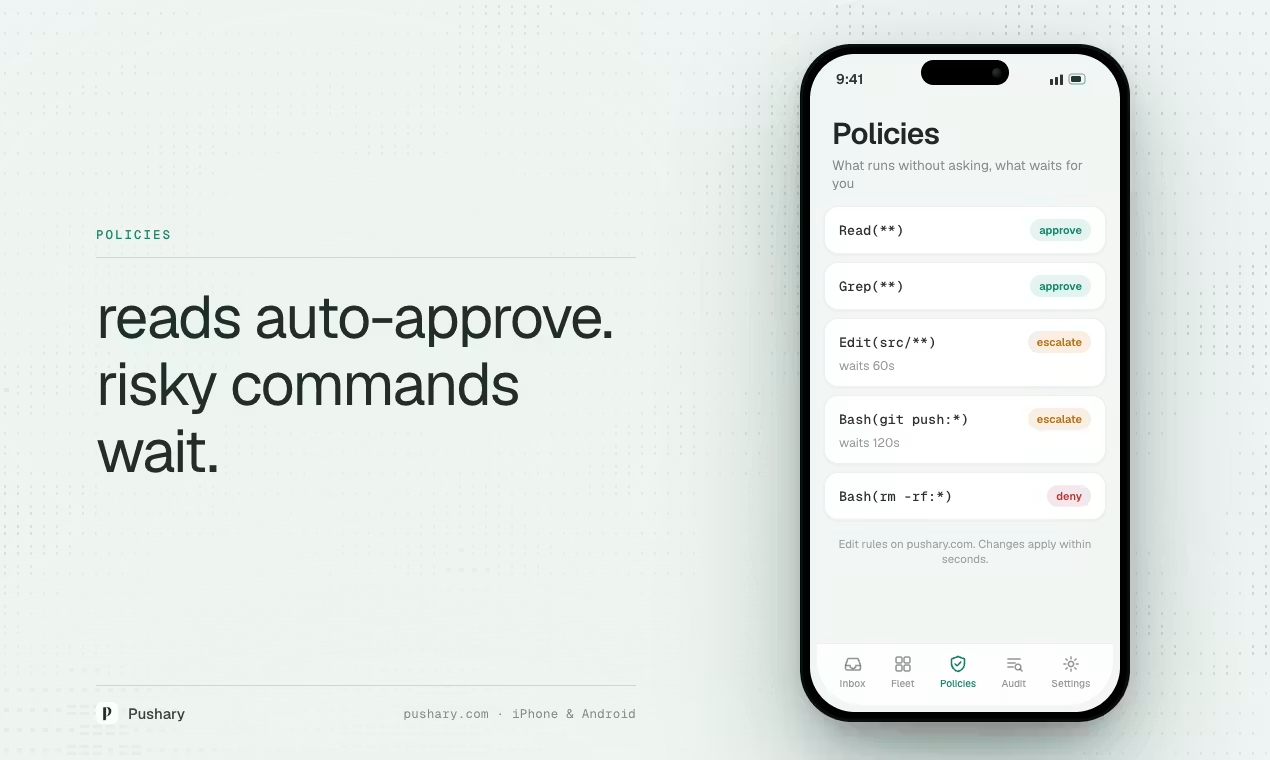
Pushary operates as a control layer between you and your AI coding agent. When the agent encounters a tool call that requires human approval — a file write outside the project directory, a shell command, a network request, or a permission prompt — Pushary intercepts that event before execution. It checks your configured rules, and if the operation needs your input, it sends a push notification to your phone. You see the tool name, the command or action description, and Approve and Deny buttons. One tap sends the decision back to the agent, which continues execution immediately. When the task finishes or fails, you get another notification. The entire interaction happens without unlocking your phone or opening your laptop.
Core Features
Lock-Screen Approvals
Your phone only buzzes when a decision is genuinely needed. You approve, deny, choose an option, or type a reply straight from your lock screen. When the task finishes or fails, you get a completion ping. No need to keep a terminal window open in the background.
Multi-Surface Routing
The same approval request can route to Slack or an n8n workflow simultaneously. Answer in one place and every other surface updates. In Slack, the agent's question lands with Approve and Deny buttons; one click answers it and the message updates with the result.
One-Command Setup
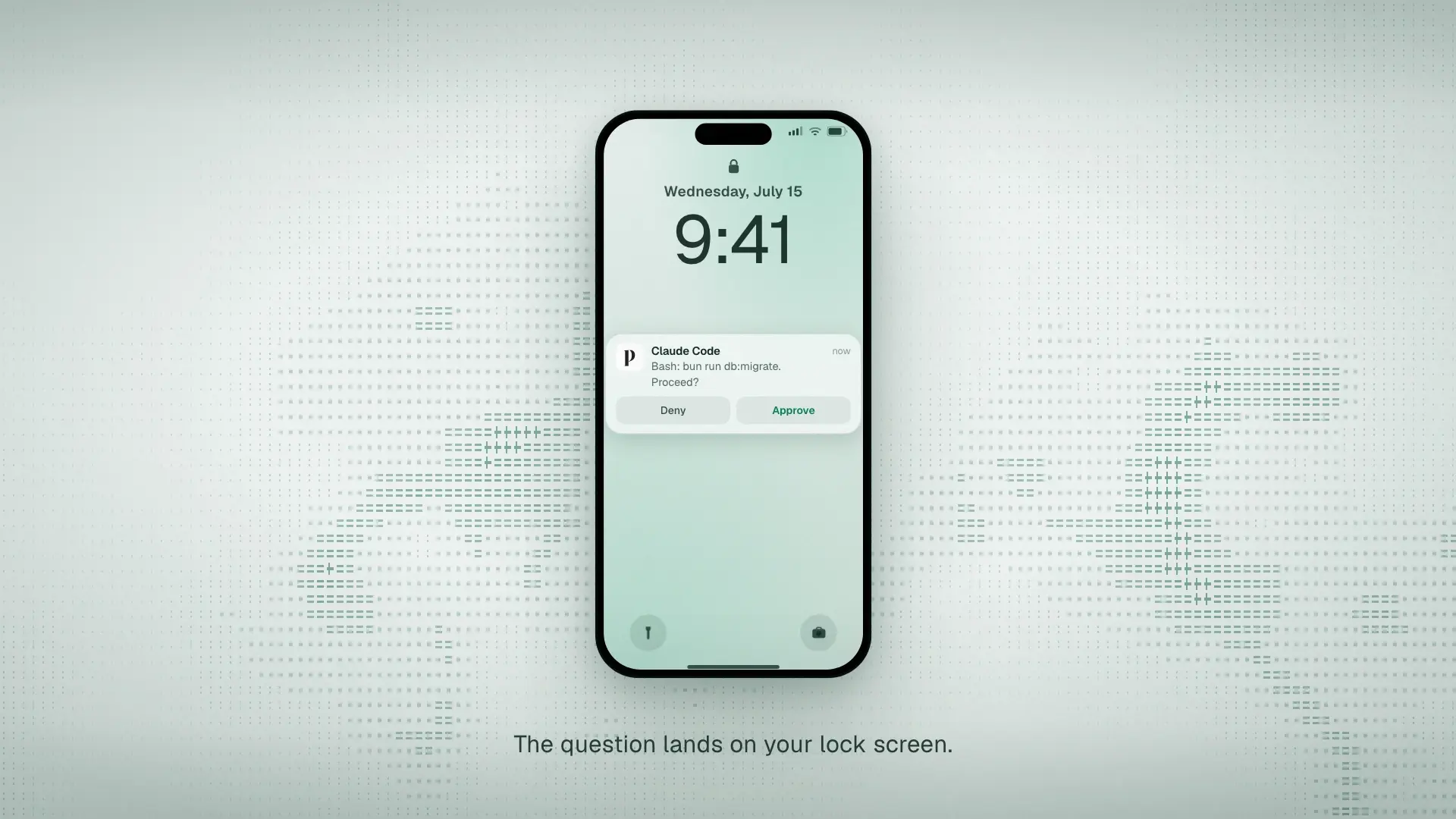
Installation takes under two minutes. Run npx @pushary/agent-hooks setup in your terminal, scan the QR code with the Pushary mobile app, and you are connected. The CLI hook handles event interception automatically for supported agents.
MCP-Native Integration
Pushary works with Claude Code, Cursor, Codex, Gemini CLI, Windsurf, Lovable, Hermes, and any agent that communicates through MCP. For CLI agents, enforcement is automatic. For MCP clients, notifications and questions route through the standard protocol.
Pricing & Plans
| Plan | Price | What's Included |
|---|---|---|
| Trial | Free for 7 days | Full access to all features, 5,000 notifications during trial |
| Agent Plan | $9.99/mo | 5,000 notifications per month, native mobile apps, web push, Slack routing, n8n integration, MCP support |
| Overage | Contact Sales | For teams exceeding 5,000 notifications/month; custom volume pricing available |
ToolRadar may earn a commission if you purchase through this link. Pricing verified from pushary.com/download as of July 2026.
Pros & Cons
✓ What Works
- ✅ Native iOS and Android apps with true lock-screen approval flow
- ✅ Supports 7+ major AI coding agents through MCP and CLI hooks
- ✅ Slack and n8n integration for team-wide approval workflows
- ✅ Setup completes in under two minutes with a single npx command
✗ What Holds It Back
- ❌ No permanent free tier — 7-day trial only, which limits casual evaluation
- ❌ 5,000 notifications/month cap may constrain heavy multi-agent users
- ❌ Parallel agent support is acknowledged by the founder as a future need, not a current strength
Learning Curve
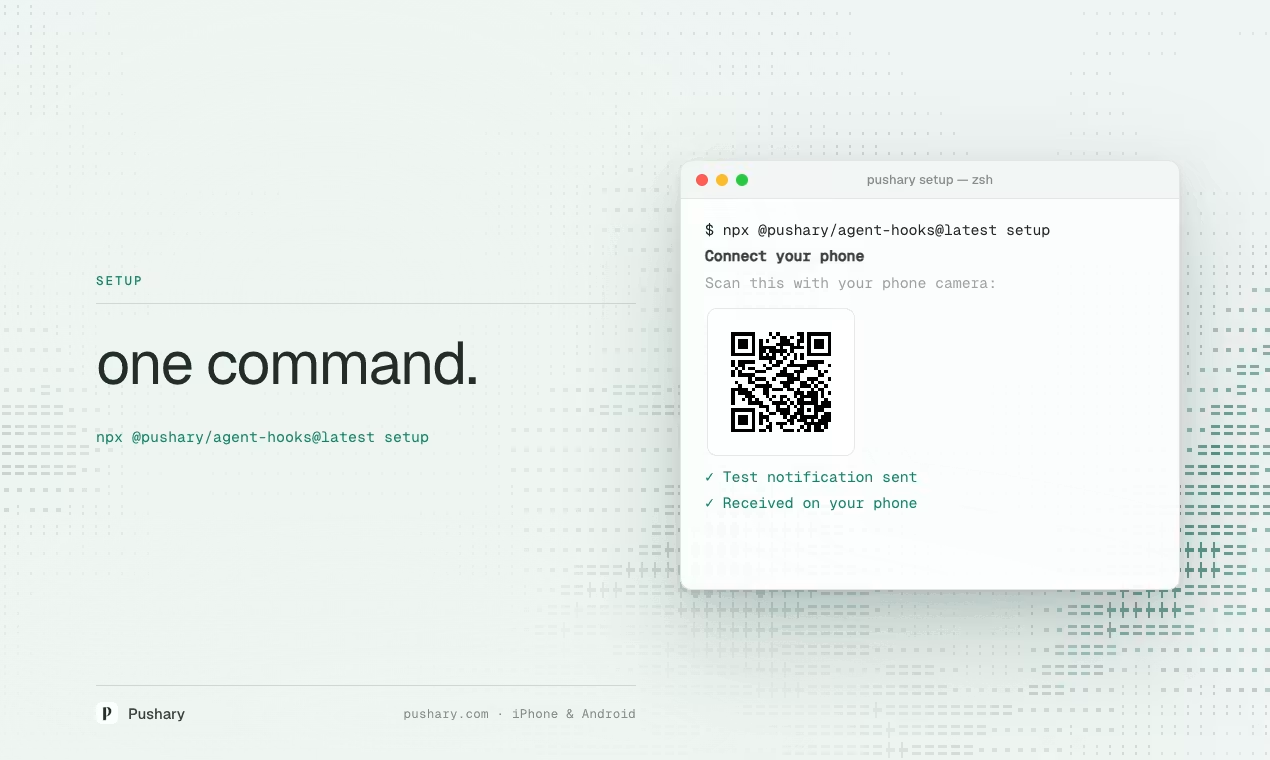
Pushary is among the fastest tools to set up in the AI developer tooling space. The entire onboarding flow consists of installing the mobile app, running one npx command in your terminal, and scanning a QR code. No configuration files, no API keys to manage, no webhook URLs to paste. For developers already comfortable with CLI tools, the setup is effectively instant. For teams, the Slack integration adds a five-minute configuration step. Compared to building a custom approval bot with n8n and Slack webhooks — which can take hours of wiring, testing, and maintenance — Pushary removes the infrastructure burden entirely. The only learning curve is understanding which agent events trigger notifications and how to set permission rules in your agent's skill or rule file. That takes about ten minutes of reading the documentation. Updated July 2026.
Who Should Use Pushary
Ideal user: Developers who spend 4+ hours daily in AI coding agents like Cursor, Claude Code, or Codex and find themselves losing productive time because they stepped away from their terminal during a long agent task. Solo developers who want lock-screen control without building custom infrastructure. Teams that need a shared approval surface through Slack. Anyone running MCP-based agents who wants human-in-the-loop gating without writing hook scripts.
Look elsewhere if: You only use AI agents occasionally for quick queries and never run long-horizon tasks. You need a fully free solution and are willing to build and maintain your own webhook-based notification system. You are already running three or more parallel agents simultaneously and need a unified dashboard view rather than per-agent notifications — Pushary's current architecture is optimized for single-agent tracking.
💡 Community Feedback
How Pushary Compares
| Feature | Pushary | Tactic Remote | Grass |
|---|---|---|---|
| Starting Price | $9.99/mo | Part of broader suite | Bundled with IDE |
| Setup Complexity | One npx command | Mac companion app | npm install + QR scan |
| Lock-Screen Approval | Native iOS/Android | APNs push | Mobile modals |
| Agent Coverage | 7+ agents, MCP-native | Claude Code focused | Claude Code primary |
| Team Integration | Slack + n8n built-in | Not emphasized | Not emphasized |
| Free Tier | 7-day trial only | Unclear | Unclear |
Pushary stands out for its breadth of agent support and its deliberate focus on notifications as a product category rather than a feature. Tactic Remote and Grass both offer mobile approval forwarding, but they are positioned as extensions of larger remote-development or cloud-IDE workflows. Pushary's single-purpose design means it integrates with more agents out of the box and offers cleaner team routing through Slack and n8n. The trade-off is that Tactic Remote and Grass may offer deeper IDE integration for users already inside those ecosystems. For developers who want a standalone approval layer that works across every agent they use, Pushary is the more flexible choice. Updated July 2026.
Expert Editorial Opinion
Pushary addresses a genuinely under-served niche. Most AI coding tooling in 2026 focuses on making the agent smarter, faster, or more autonomous. Very little attention goes to the human side of the loop — the moment when the agent needs a decision and the human is not at their desk. Pushary treats that moment as a first-class product problem, not an afterthought. The result is a tool that does one thing extremely well: it closes the latency gap between "agent needs input" and "human provides input."
Technically, the implementation is sound. The MCP-native architecture means Pushary does not require custom adapters for every new agent. As long as an agent speaks MCP or exposes CLI hooks, Pushary can intercept its events. The QR-code pairing is a smart UX choice — it removes the friction of API keys, OAuth flows, or manual configuration. The Slack and n8n integrations show the team understands that approvals are not always individual decisions; in production environments, a team member other than the task initiator may need to sign off.
Where Pushary sits in the broader market is interesting. It is not competing with Cursor, Claude Code, or Codex. It is competing with the habit of keeping a terminal window open on a second monitor and checking it every few minutes. That is a large addressable market of developers who are already paying $20–$200 per month for their agent seat and would pay another $10 to stop babysitting it. The Product Hunt traction and the founder's public iteration with the community suggest the product is moving in the right direction.
The pricing gap is worth examining. At $9.99 per month for 5,000 notifications, Pushary is priced below most AI coding tool subscriptions. The 7-day trial is generous enough to evaluate the core workflow, but the absence of a permanent free tier creates friction for developers who want to test it on a single project before committing. Compared to building a custom Slack webhook — which is free but costs engineering time — Pushary's value proposition is time savings, not cost savings. For a developer billing at $75–$100 per hour, one avoided context-switch pays for the monthly subscription.
Is it worth subscribing without a free tier? For developers running long-horizon agent tasks daily, yes. The time recovered from not checking terminals and not discovering agents stuck on permission prompts is measurable within the first week. For casual users who fire off an agent task once a week, the subscription is harder to justify. The 7-day trial is the deciding factor here — it is long enough to know whether the workflow fits your style. If you find yourself checking your terminal less than twice a day during agent runs, Pushary is probably not for you. If you check it ten times, the subscription pays for itself in reclaimed focus.
Final Verdict
Pushary is a well-executed solution to a specific, real problem: the human latency gap in AI coding agent workflows. It integrates cleanly with the major agents developers already use, sets up in minutes, and delivers on its core promise of lock-screen approvals. The $9.99 price point is reasonable for daily users, though the lack of a permanent free tier and the 5,000-notification cap are genuine limitations. The parallel-agent concern raised by the community is valid, but for the current generation of single-agent workflows, Pushary is the most focused and flexible approval layer available. It earns a 7.8 out of 10 — a strong recommendation for developers who live inside AI agents and want their phone to handle the interruptions.
Technical Quality: 8/10 · Price-to-Value Ratio: 7.5/10 · Maturity & Documentation: 8/10
 Try Pushary Free for 7 Days →
🔗 Related ToolRadar Reviews
More tools from AI Developer Tools
- I Built a Real Mac App From a Chat Prompt
- I Built a Production AI Agent in 10 Minutes
- I Gave an AI Agent Full Control of My Codebase
- I Replaced My Brittle Playwright Tests With AI
- I Turned a Napkin Sketch Into Production Code
- I Controlled Claude Code With My Voice
- I Built an AI Agent Army Without Writing a Single Line of Code
- Beyond the Hype: Google ADK 2026 AI Agent Framework
❓ Frequently Asked Questions
What would you build if your AI agent never had to wait for you again?
Pushary is betting that the future of coding isn't more autonomous agents — it's agents that know exactly when to pull a human back into the loop. The question is whether you want that loop to happen on your lock screen, or in a terminal window you forgot to check.

Comments
Post a Comment