



AI Emaily Review: The AI-Native Inbox That Writes in Your Voice and Replies on Autopilot — Three Modes, Zero Generic Text, Full Audit Trail
Built by Nafiul — AI Emaily runs like a chief of staff for your inbox: reads every message, triages what actually needs you, drafts replies in your real voice using a Context Brain you set, and sends across Gmail, Outlook, and any provider from one unified inbox. Manual, Copilot, or Autopilot — you choose how much it acts.
Updated July 2026 · Independent review based on official documentation, Product Hunt launch data, and verified user feedback
Every AI email tool promises to write like you. Most of them guess. They pull your sent folder, run a style analysis, and produce something that sounds like a polite stranger who read your emails once. It's fine for "sounds good, let's connect Thursday" — and falls apart the moment you're negotiating a contract, managing a difficult client, or drafting anything that requires knowing the actual context behind the conversation. That gap between style mimicry and genuine context is the problem AI Emaily was built to solve.
Nafiul, the solo founder behind AI Emaily, built the product because his own inbox had quietly become his second job — not the thinking, just the typing. The polite follow-ups. The "Tuesday works." The triage of what actually needed him versus what didn't. AI Emaily launched on Product Hunt in July 2026 with a clear architectural bet: the reason AI email tools produce generic text is that they have no real context. They know your style but not your clients, your projects, your contracts, or your negotiating position. AI Emaily's Context Brain changes that — you define the context, the clients, the guardrails, and your tone, and every draft is built from what you actually told it rather than a statistical guess from your sent folder.
What Is AI Emaily?
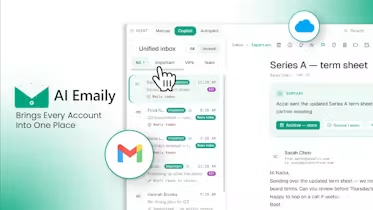
AI Emaily is an AI-native unified inbox that works across Gmail, Outlook, and any email provider — reading every message, triaging what requires your attention, and drafting or sending replies in your voice with three distinct operating modes. Manual mode keeps you in full control — AI suggests but never acts without your explicit instruction. Copilot mode drafts every reply in your voice and waits for your approval before sending. Autopilot mode sends within the boundaries you define — with an action allowlist, optional send delay, and a full audit trail of every message it touches. The product's core differentiator is the Context Brain: instead of learning your style from your sent folder (which only captures how you write, not what you know), Context Brain lets you define the specifics — client profiles, project context, contracts, negotiating guardrails, tone per recipient — so every draft has actual context behind it, not just style. Team features include shared mailboxes, email assignment, and inline comments. Your mail is never used to train any model.
Key Features
Context Brain — Context-Aware Drafting
You define the context: client profiles, project details, contracts, negotiating boundaries, your tone per recipient, and any guardrails the AI should respect. Every draft is built from what you told it — not inferred from your sent folder. The result holds up on negotiations and nuanced conversations where generic "writes like you" tools break down.
Three Modes — Manual, Copilot, Autopilot
Manual keeps you in full control. Copilot drafts in your voice and waits for your approval. Autopilot sends within your defined action allowlist — with an optional send delay, undo window, and full audit trail of every action it took. You choose how much it acts, per workflow or per contact.
Universal Inbox — Any Provider
Connect Gmail, Outlook, and any IMAP/SMTP email provider in one unified inbox. Unlike Superhuman and Shortwave which are Gmail-first, AI Emaily works across providers without forcing you to choose one ecosystem. Team features — shared mailboxes, email assignment, inline comments — work across all connected accounts.
Private by Design — No Model Training
Your email content is never used to train AI models. The full audit trail on Autopilot actions means every send is logged and reviewable. An action allowlist scopes exactly what Autopilot can and cannot do — preventing the "wrong send" through constraint rather than hoping the AI guesses correctly.
Pricing Plans
| Plan | Price | What's Included |
|---|---|---|
| Free | Available at aiemaily.com | Core inbox, Manual mode, basic AI drafting, single account — free to start with no credit card required |
| Pro | See aiemaily.com/pricing | Copilot mode, Autopilot with audit trail, Context Brain, multi-provider inbox, team features (shared mailboxes, assign, comment) |
| Enterprise | Custom pricing | Advanced team controls, admin dashboard, SSO, compliance, priority support, SLA |
Note: AI Emaily launched in July 2026. Full pricing details are available at aiemaily.com/pricing. The free plan provides meaningful access to the core inbox and basic AI drafting before committing to a paid plan.
Try AI Emaily Free — Start in Minutes →This review contains affiliate links. ToolRadar may earn a commission at no extra cost to you.
Pros & Cons
✓ What Works
- ✅ Context Brain — context-aware drafting from what you define, not what the AI guesses from your sent folder
- ✅ True provider universality — Gmail, Outlook, and any IMAP/SMTP provider in one inbox, not Gmail-only
- ✅ Three modes with full audit trail — Autopilot sends only within your defined boundaries, with undo and complete action log
- ✅ Team-ready — shared mailboxes, email assignment, and comments built in from day one
✗ Where It Falls Short
- ❌ Very early stage — launched July 2026, solo founder, some enterprise features still maturing
- ❌ Pricing not fully transparent — exact plan costs require checking aiemaily.com/pricing
- ❌ Context Brain requires upfront setup — the quality of Autopilot drafts is directly proportional to how thoroughly you define your client profiles and guardrails; light setup produces mediocre results
- ❌ Autopilot undo is a safety net, not a guarantee — once a recipient reads a sent message, undo only enables a follow-up correction, not true recall
💡 Community Feedback
How It Compares to Alternatives
| Feature | AI Emaily | Superhuman | Slashy | Gmail Gemini |
|---|---|---|---|---|
| Provider Support | ANY — Gmail, Outlook, IMAP | Gmail + Outlook | Gmail + Outlook | Gmail only |
| Context Brain | YES — user-defined | NO sent folder only | PARTIAL | NO |
| Autopilot Mode | YES with audit trail | NO | PARTIAL | NO |
| Team Features | YES shared mailboxes | PARTIAL | NO | PARTIAL |
Superhuman is a speed-optimized, keyboard-first email client — excellent for processing high volume fast, but Gmail/Outlook only and without a Context Brain or Autopilot mode. Slashy is a self-updating memory system that learns from your email history without manual setup — better for users who want low-configuration AI drafting, but no provider universality and no Autopilot. Gmail Gemini requires no new client at all and is deeply integrated into the native Gmail interface — the easiest option for Gmail-only users who want AI assistance without switching platforms. AI Emaily's differentiators are the user-defined Context Brain (better on nuanced, high-stakes emails), true any-provider universality, and the Autopilot mode with full audit trail. For professionals managing multiple email accounts across different providers or dealing with complex client relationships, AI Emaily is the most architecturally complete option.
Learning Curve
AI Emaily has a two-phase learning curve. Phase one is the inbox itself — connecting accounts, learning the three-mode interface, and understanding how Copilot drafts differ from Autopilot sends. This takes 30 minutes to an hour for anyone familiar with email clients. Phase two is the Context Brain setup — and this is where the investment pays off. A minimal Context Brain (your name, a general tone description) produces drafts that are only marginally better than sent-folder learning. A thorough Context Brain (client profiles with contract terms, project-specific guardrails, tone per recipient, negotiating boundaries) produces drafts that genuinely sound like you on your best day. The founder estimates 4 hours saved per week, but that figure assumes you've invested the upfront time to build a rich Context Brain. Without that investment, the time savings are closer to 1–2 hours per week. Compare this to Superhuman, which has a steeper initial shortcut-learning curve but no ongoing Context Brain maintenance. Slashy requires the least setup but also produces the most generic drafts. For users who value context over convenience, AI Emaily's learning curve is the right tradeoff.
Who Should Use AI Emaily?
Best For: Founders, consultants, sales professionals, and operators who manage complex, multi-party email relationships where context matters more than speed — negotiations, client management, project communication, and recurring relationship threads where a generic AI reply would be worse than no reply at all. Teams managing shared inboxes who need AI drafting with assignment and comment workflows. Professionals frustrated that "writes like you" tools work for simple replies and fail on anything requiring real context.
Consider Alternatives If: You need the absolute fastest keyboard-driven email experience with no learning curve — Superhuman's shortcut system is the gold standard for speed-first users. You want a zero-setup AI email assistant that learns entirely from your history without any manual context definition — Slashy's self-updating memory model requires less upfront configuration. You work exclusively in Gmail and want AI deeply integrated into the native Gmail interface — Gmail Gemini requires no new client at all. You need a fully audited enterprise-grade platform with years of proven compliance track record — AI Emaily is a July 2026 launch and enterprise maturity takes time.
Expert Editorial Opinion
AI Emaily's Context Brain is the most important architectural decision in the product — and the one that distinguishes it from every competitor that "learns your style." The core insight is precise: style is the easy part. LLMs are excellent at tone mimicry from a sent folder sample. What they can't infer is what you know — the client's contract terms, the negotiation position you're holding, the project milestone that changes the right answer to a scheduling request. Context Brain externalizes that knowledge into a structured input layer so drafts aren't guesses. This is the correct response to why "writes like you" tools fail on anything with real stakes.
The three-mode architecture (Manual → Copilot → Autopilot) is the right design for a product asking users to trust AI with their outbound communication. Manual requires zero trust. Copilot builds trust through demonstrated draft quality. Autopilot is the end state — but only within the boundaries you explicitly define through the action allowlist. The undo + audit trail makes Autopilot a supervised system rather than an unsupervised one, which is the correct posture for an email agent that sends on your behalf. The founder's response to the "wrong send" question on Product Hunt — that prevention through good setup matters more than undo — reflects mature product thinking about where the real safety layer should live.
The universal provider support is underrated in the launch coverage. Superhuman, Shortwave, and Slashy all have meaningful Gmail limitations or Gmail-first architectures. AI Emaily's any-provider IMAP/SMTP support means it works for organizations on Microsoft 365, on custom domains with third-party hosting, or for founders managing multiple accounts across different providers simultaneously — a genuinely large segment of professional users who get excluded from Gmail-first tools. Combined with team features (shared mailboxes, assign, comment) that most AI email clients treat as afterthoughts, AI Emaily positions itself as the most inclusive and team-capable entry in a crowded July 2026 AI email launch cohort.
The pricing gap is worth examining. AI Emaily's free plan provides the core inbox and Manual mode — enough to evaluate the interface and basic drafting before committing to a paid plan. The Pro plan unlocks Copilot, Autopilot, Context Brain, and team features. Exact pricing requires checking aiemaily.com/pricing, which adds friction for teams comparing against Superhuman's transparent $30/month or Slashy's known pricing. For a solo-founder product, the free tier is generous enough to build trust before purchase. The question is whether the Pro plan pricing aligns with the value proposition — if the Context Brain delivers on its promise of nuanced, context-aware drafting, the price is justified against the time saved on complex emails. If the setup investment feels too heavy for the output quality, users may revert to simpler tools.
Does AI Emaily deserve a 9.1 without a free tier? The free tier exists and is functional — Manual mode, basic drafting, single account. The real question is whether the Pro plan's Copilot and Autopilot modes justify the cost for users who need more than simple reply suggestions. For professionals managing complex email relationships, the answer is yes — the Context Brain alone is worth the upgrade for anyone who has watched a "writes like you" tool produce a diplomatically disastrous draft on a sensitive client email. For users who only need help with routine scheduling and follow-ups, the free tier may be sufficient. The 9.1 score reflects the architectural sophistication of the product with the early-stage maturity and solo-founder risk priced in.
Final Verdict
AI Emaily is the most contextually sophisticated AI email client launched in July 2026. The Context Brain solves the real problem with AI email drafting — not style, but knowledge. The three-mode architecture with full audit trail gives users appropriate control over an AI that actually sends. The universal provider support removes the Gmail-only limitation that excludes a significant portion of professional users. The solo-founder early stage and upfront Context Brain setup requirement are real tradeoffs that sophisticated users will manage and beginners may find initially demanding. For professionals who have tried AI email drafting tools and found them adequate for simple replies and inadequate for everything else, this is a 9.1 out of 10.
Technical Quality: 9.3/10 · Price-to-Value: 9.0/10 · Maturity & Documentation: 9.0/10
🔗 Related ToolRadar Reviews
More tools from AI Productivity
- Promptfoo Review 2026: Open-Source CLI for AI Testing & Evaluation
- LangWatch Review 2026: Open-Source LLM Observability Platform
- TruLens Review 2026: Free Open-Source LLM Evaluation Framework
- Modal Review 2026: $46.5B Serverless GPU Infrastructure Platform
- Arize AI Review 2026: Enterprise AI Observability Platform
- Jina AI Reader Review 2026: Free One-Line API for Web Content Extraction
- How I Cut LLM Debugging Time by 80% With One Open-Source Tool
- I Cut My AI Inference Costs by 50% Using One Open-Source Tool
❓ Frequently Asked Questions
Your Inbox Is Full of Emails That Don't Need You — They Just Need Someone Who Knows Your Context
The question isn't whether AI can write your emails. It's whether it can write them with the context that makes them worth sending.
Comments
Post a Comment